



Harm_Millaard
Inspiring
January 11, 2012
Question

What PC to build? An update...

  • January 11, 2012
  • 25 replies
  • 130896 views

What PC to build, updated January 2012


A question often asked is what system to build for NLE.


The previous article about this topic dates back to March 2010, so it was due an update because there were so many new developments in the past two years, including CS5.5

Basically you can think along three roads, a budget PC, an economical PC and the warrior PC. Notice that MAC is not mentioned here. There are three reasons for that, one is I'm not qualified to really advise on MAC's, two is that they are way overpriced and three they are severely limited in component choices. So this is all about PC.

Whether you want to have a budget, economical or warrior PC, there are a number of common components that you will always need, a case, a PSU, CPU cooler, monitor, keyboard, mouse, DVD/BR burner and stuff like that so I'm not going into those components, with the exception of case, PSU and CPU cooler.

CASE:

While the case of your choice is often determined by looks and what appeals to you (or your CFO, the wife), I want to stress that for all categories, budget, economical or warrior, it is better to use a BIG tower, instead of a mid tower.

Why, you may wonder. Actually there are a lot of reasons. Mid towers can limit your choices in CPU coolers, because the case is not wide enough to install certain CPU coolers. The height of the cooler does not fit in the case. They can limit your choice of video card, because these have grown in length significantly and mid towers often do not allow the installation of certain video cards due to the limited depth or prevent you from installing hard disks in certain slots. Mid towers will limit your expansion capabilities (less drive cages), make installation of components more difficult, have limited cable management features, have limited airflow and tend to become hotter than big towers and thus more noisy (the fans need to run at higher speed) and limit overclockabilty.

A BIG tower is the (only) way to go.


PSU:

The PSU is one of the most crucial components in any system but also the one component most often overlooked. A good PSU will give you years of reliable work on your PC, a suboptimal or mediocre PSU will give you tremendous headaches and unexplainable crashes, hangs or errors, causing you to miss deadlines.

Go to eXtreme Power Supply Calculator Pro v2.5 and get the Pro version. Enter all your components, including planned expansions, set the Motherboard to High End - Desktop, set the CPU Utilization (TDP) to 100%, set System Load to 100% and Capacitor Aging to 30% and press the Calculate button. Add 10 - 15% to this Wattage for safety and note the required amperage on the various rails (+3.3V, +5V and +12V). Based on these figures, select a good GOLD label PSU, that meets the total wattage and the amperage on each rail. It is your best guarantee for long and reliable, troublefree editing.

Budget, economical or warrior system


Before going into these three systems, you can consider them to be a rough 'Best-buying Guide', let me remind you of the basic practical system requirements for CS5.5 and consider your own workflow to interpret these charts.

It starts with the codec:
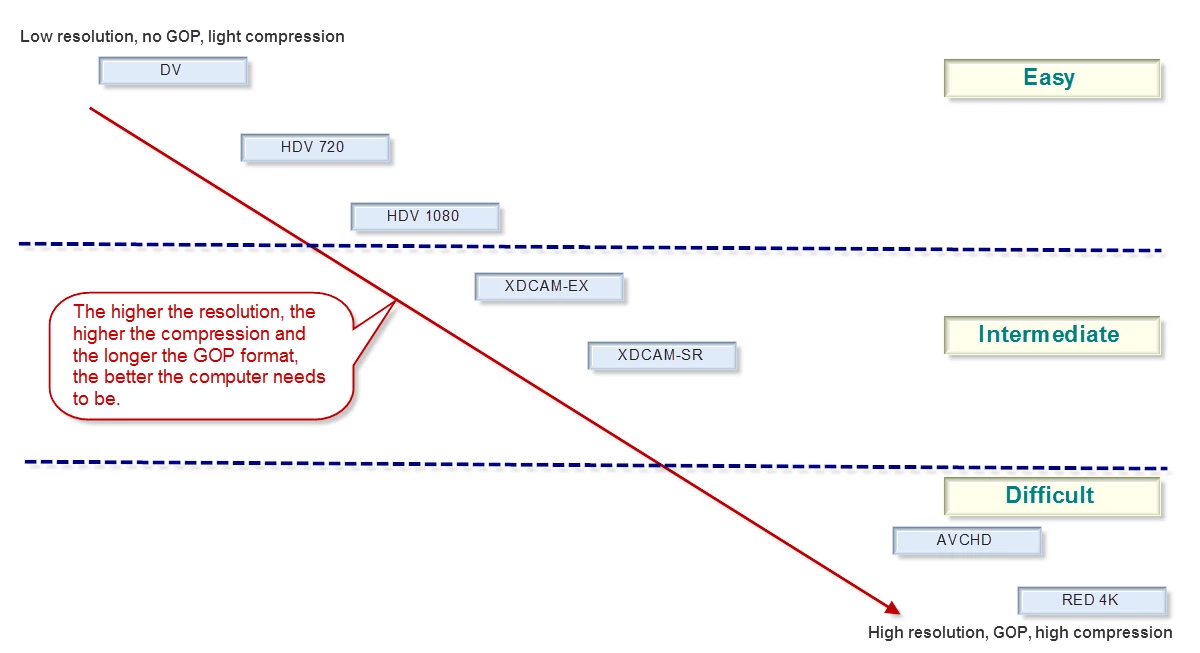
Since DSLR is getting so popular, let me remind you that this is ranked under the 'Difficult' codecs and P2 is an 'Easy' codec. The more difficult the codec you use, the higher the system requirements. See:
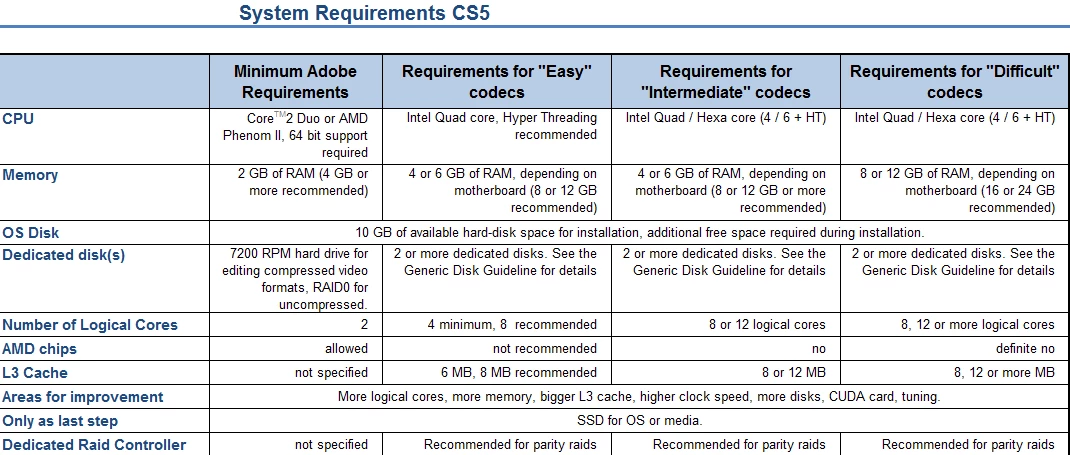
For the full article, see Adobe Forums: System requirements for CS5

As a rough translation from 'Easy', 'Intermediate' and 'Difficult' to the kind of system you want to build, you could say that 'Easy' can be handled quite well with a 'Budget' system, 'Intermediate' is best handled by an 'Economical' or better system and 'Difficult' requires an 'Economical' or better system. A 'Budget' system may struggle with the load of such 'Difficult' codecs.

Note that in the following table, I have mentioned components in each category. These are just examples of what could fit in each category, they are not necessarily a combination of components that I would build per se.

Also note that I have not chosen the fastest CPU in each category, but only unlocked CPU's. Each can be overclocked for optimal results and then will deliver a better Bang-For-The-Buck (BFTB) than the highest clocked CPU in that range. Finally, note that the budget system can benefit from increasing memory to 4 x 4 GB for only € 38 extra. That is the weakest link in the budget system.

Prices mentioned are current day prices in the Netherlands (01-11-2012) including 19% VAT.

Here are my suggestions:
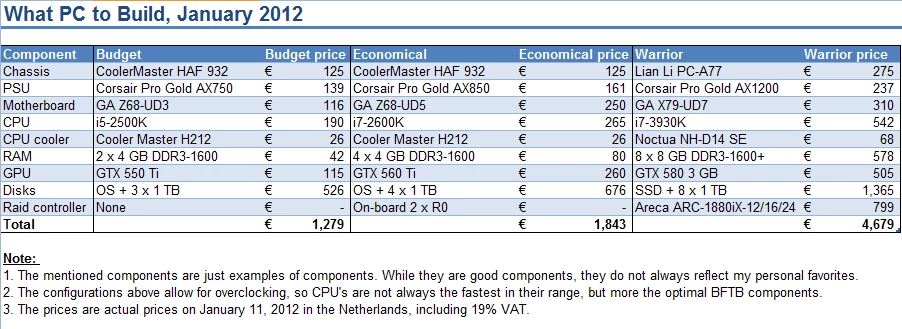
The main difference in comparison to the previous guide, is that the i7-3930K appears to be faster and better affordable than a dual Xeon X5680 system.

Anyway, I hope this helps people comtemplating a new system to get the right components in an affordable system.

This topic has been closed for replies.

25 replies

FlannelAndrew
Participating Frequently
February 13, 2012

To all,

I just read I neat article about two mysterious switches on my Asus mobo, the TPU and EPU. This may be of interest to people who don't know how to overclock their systems like myself, but are building the system to do it. Seems like you can get most of the gains with an ounce of the effort thanks to some clever engineering on Asus' part. Possibly something to consider when shopping for mobo's. Though, perhaps this is also sacrilige to the resident gurus.


http://www.overclock3d.net/reviews/cpu_mainboard/asus_dual_intelligent_processors_review/1

I haven't tried it out yet personally, but I should be up and running within a week or so, then I can see how it goes.

FlannelAndrew
Participating Frequently
March 5, 2012

Hey All,


I wanted to report back on ASUS's mobo EPU and TPU, as well as SSD Caching on my new system. First off, EPU and TPU are truly effortless utilities with awesome results. I can't actually measure my power consumption, but presumably if it's decreased, I haven't noticed an impact on my performance. The TPU requires a click of the button on either "Fast" or "Extreme", then after an automated reboot or two, my i7 went from a 3.4 Ghz to 4.4 Ghz on the "Fast" setting. I had no experience with overclocking, but with results like that, it's one less thing for me to worry about screwing up. I definitely recommend the ASUS mobos with these features to anyone looking to get the most out of their system with limited or no knowledge on overclocking or power managment.

As far SSD caching goes, it can be problematic, but even in my limited time with it, it was well worth it. My windows bootup is easily a half to a third of what it was. I assume as I load more on my system, I'll come to appreciate it more. Not sure how it's going to impact my Premiere usage yet, but I'm optimistic. I'll report back on that. My advice if you're looking into SSD Caching is as follows: 1. Create a system image (or backup if you'd like a fresh install) 2. RAID has to be enabled in the BIOS, meaning you'll need to reinstall windows if you're using AHCI or IDE. and 3. DON'T connect the SSD until after windows is installed and SP1 (I'm know one of these is the culprit of my first attempts system failure, not sure which). Get it all right and all it takes is a couple clicks in Intel's RST tool and you're on your way to performance where you need it.

For more information on either I recommend these articles on TPU and EPU and SSD Caching.

Andrew

Participant
February 10, 2012

Great information here.  Thank you for posting.  i've been conferring with my IT dept. and think we've come up with specs that will fit our budget.  I wonder if you folks would take a look and tell me if there are any glaring problems with our decision.  i will be editing with AVCHD (new to me with this purchase).  while i'm currently using AVID Liquid Pro, we are upgrading to Premiere Pro CS5 and this is what we're looking to put together in a system......

HP Z800 (FM104UT)

Xeon E5620   2.4 GHz processor

16 GB RAM

1 TB Internal HD

NVIDIA Quadro 4000 Graphics

DVD writer

Blue Ray writer

USB 3.0 card

2 external / portable USB 3.0 HD

multicard reader

Bill Gehrke
Inspiring
February 10, 2012

It is a shame that you cannot convince your IT department to get a system designed for video editing, like ADK does.  You only have 8 GB per processor which is awful weak.  You would be much better off with a single, faster, newer, overclockable processor tuned for NLE work.  You are buying CPU's (LGA 1366) that are now several generations old.

Participant
February 9, 2012

Thanks so much harm for this thread and the many answers, which is exactly what I was looking for.

I need a workstation to run cs5.5. I'm mostly using PPro and AE, for 30min movies using lots of VFX on HDV rushes.

I have a little extra $$ to boost from your "economic" config. What would you recommend given my needs? Increase RAM to 32 Gb or upgrade the video card to the GTX580? Would it unbalanced the whole wkstation by creating bottlenecks? What if I do both upgrades?

Best

Zovic

Harm_Millaard
Inspiring
February 9, 2012

Step 1: Increase memory to 4 x 8 GB

Step 2: Upgrade the video card to a GTX 570 with the maximum amount of VRAM available.

The GTX 580 has such a marginal performance gain over the 570, that it only appears worthwhile if you are using RED, EPIC or similar large resolution stuff, because then the 3 GB 580 comes in handy.

Keep your eyes open for nVidia announcements of their new 6xx/7xx line of video cards. That is expected shortly and will give you new options, either a faster new card, or price reductions on the 5xx line.

Participant
February 9, 2012

Harm: thanks so much for your fast and precise answer!

Participating Frequently
February 7, 2012

This is a great update about PC hardware. On the other hand, I would like to that think it would be great to write a discussion about the recommended display and monitoring solution for Premiere Pro in a similar way, considering footage, vendors, budget etc.

Dr_Jared
Participating Frequently
January 12, 2012

Would it knock my socks off, or would I hardly notice the difference?

Dr_Jared
Participating Frequently
January 12, 2012

Are you suggesting I sell my current Quadro 4000 card - which as far as I can tell is working like a rocket,  and spend $$$ on a GTX560 or GTX580?  I do basic long-form editing with HD1080 footage.  Would it knock my socks off, or would I hardly notice the difference?

Harm_Millaard
Inspiring
January 12, 2012

Dr Jared,

You have directed your posts to me and not to anyone else. (see in response to:...). That is no problem for me, but let me emphasize that in the screenshot I posted, I only mentioned three distinct type of PC's in very different price categories and for very different purposes. As I said in my post I used "example" components that could well apply to a typical PC in that range. That means that a newly build PC could very well contain quite diferent components or move into a gray area between two distinct categories. Remember this overview only serves the purpose of showing what a PC can look like in a certain price range, nothing more. It certainly is not a law to follow, it is an indication of my opinion with the current state of affairs.

Whether one person is happy or not with a Quadro 4000 card is up to that person. The whole discussion seems a waste of time. If you are happy with your 4000, great. If someone needs to buy a card, then there are better and more affordable cards available, delivering a better BFTB. As long as people realize that, they can make their own decisions.

Dr_Jared
Participating Frequently
January 12, 2012

Hi Harm - sorry, I was using the 'reply to original post' button - didn't see the 'reply' one.

Comments were not directed at you but at Scott.  I was trying to get his commitment to my that selling my Quadro4000 and replacing it with a GTX580 would be of noticable REAL WORLD benefit, or if he's just arguing theoretical benchmark schemantics.

Personally I think when the GTX590-Ti-Pro-Ferma3-hyper  is released,  he'll be telling me the GTX580 is a waste of time and only losers use them.

I've made my decision.

Dr_Jared
Participating Frequently
January 12, 2012

You sound like you know your stuff,  however it's very confusing to the average punter like me to build a nice editing system with such conflicting information.  You have given the impression above that the Quadro 4000 is an inferior card for editing with CS5.5 - however it is currently the top card recommended by Gary @ Videoguys.  And that for some bizarre reason an 80-Plus Gold PSU is going to make a better machine than having a Thermaltake PSU??

Technology is evolving at such a fast rate these days,  but the launch of the newest and fastest does not make current technology instantly inferior.

I would suggest that you are technically correct, but living too much in a benchmarking world.  In a real world,  isn't it more helpful to say that "both the Quadro 4000 and GTX580 are very powerful nVidia cards and either would make a great choice for CS5.5 editing."

If I'm currently using a Quadro 4000,  and then "upgrade" to a GTX580,  would it (a) totally change my life and revolutionise my business,  or  (b) shave a couple of micro-seconds off a render which I'd probably wouldn't even notice?

Participating Frequently
January 12, 2012

The Quadro 4000 is over hyped and over priced as well as underperforming.

Unless you are using Solidworks or 1-2 other 3d Animation programs any Quadro is pointless.

Its based on a GTX 460

So basically there “DOC” you over paid for an underperforming video card.. but hey what do I know…

A 560 would do better.

Scott

ADK

Inspiring
January 12, 2012

I second that motion!! As Teddy Roosevelt would say, " BULLY for Harm!!

Dr_Jared
Participating Frequently
January 11, 2012

Hello Harm,

Thank you very much for this great information!

I've been planning my next DIY computer for several months now and my first battle was finding information from someone I could trust, and that delivered information in a clear, logical, and unbiased standpoint.

Gary from VideoGuys has been a real inspiration and I rush to my PC every morning and check for DIY9 blog updates,  already started buying parts!  As the DIY9 system is  linked to a modest budget,  I need to now weigh up whether to tweak it upward$ to a (let's say) "DIY9 UNLEASHED" - full tower, water cooling etc, or stick to the exact components recommended.  The information you've provided is very valuable and makes great sense - thank you again.

Thomas - thank you also for the link to the Tsunami system - very interesting!  Thank you for sharing information and component choices.

Once I learnt to ignore a certain other long time contributor who comes across with a real combatitive attitude, and who is very "secret squirrel" about internal component choices,  it became much clearer who to listen to.

Knowledge will set you free!  Keep up the good work guys!

Participating Frequently
January 11, 2012

[Message deleted by forum host - commercial advertising is not permitted]

Participating Frequently
January 11, 2012

really?

first stinking post and you come in here Spamming the forums

no class man!

scott

ADK

PS do you see any links in my sig? nope as thats called trolling..

Participating Frequently
January 11, 2012