Participant
April 17, 2020
Answered

Which drive should i use?

  • April 17, 2020
  • 3 replies
  • 703 views

Hi all,

just ungraded my computer and wondered which drive(s) I should a) install os on. b)install premier on. c)media?

i have a setup as follows: an nvme drive 256gb a 250gb SSD and a few 1tb HDD.

i also have another nvme slot that I'm going to populate with perhaps a bit bigger nvme, in the near future.

The os is on nvme drive with premier on. The SSD has media and projects on. 1tb is used as a backup drive.

Is this the best way to have my setup, or should I change it? I obviously want the best drive performance.

thanks

Dave

This topic has been closed for replies.
Correct answer MyerPj

I think your way is the best right now. Simply move all your project info to the new nvme when you get that.


Bill Gehrke did a lot of testing and he concluded that even just one nvme was fast enough. So if you have 2, use all the default PP settings (on the c: drive) and your project and media on the 2nd, you will not have any bottlenecks with drives.


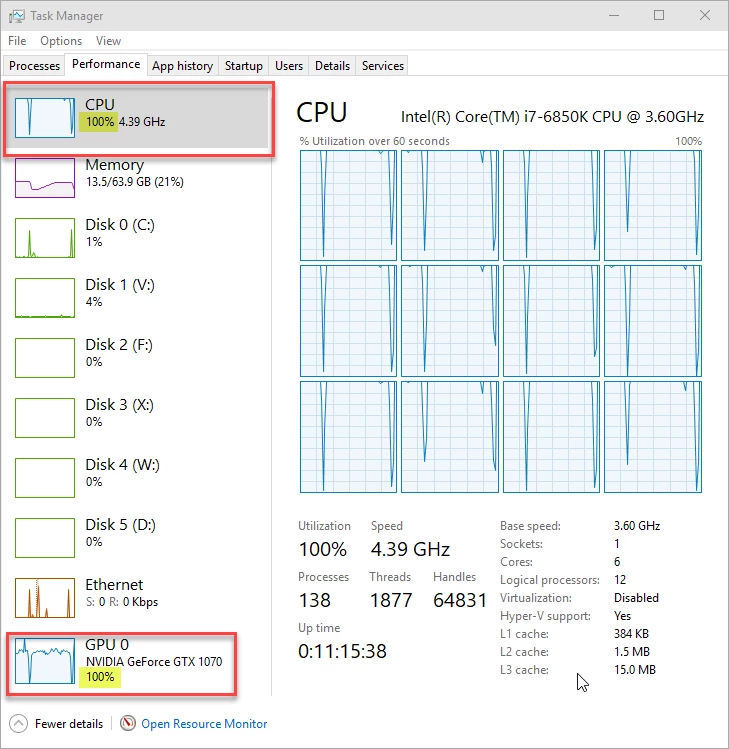
Check out my CPU and GPU running full tilt while making reduced resolution proxies and the drive at 4%!


3 replies

Peru Bob
Community Expert
Community Expert
April 17, 2020

I've moved this to the Video Hardware forum.

Participant
April 18, 2020

Thank you Bob for placing this in the correct forum.

Thanks John for you input.

MyerPj wow, 100% on both and only 4% on the drive.. thank you for the advice on this, much appreciated.

cannot wait to get the second nvme drive. Thank you everyone

regards and stay safe

Dave

MyerPj
Community Expert
MyerPjCommunity ExpertCorrect answer
Community Expert
April 17, 2020

I think your way is the best right now. Simply move all your project info to the new nvme when you get that.


Bill Gehrke did a lot of testing and he concluded that even just one nvme was fast enough. So if you have 2, use all the default PP settings (on the c: drive) and your project and media on the 2nd, you will not have any bottlenecks with drives.


Check out my CPU and GPU running full tilt while making reduced resolution proxies and the drive at 4%!


Participant
June 3, 2021

Hi,


Thanks MyerPj for your very helpful response to Dave Gregson.


I am hoping to get some further clarification from the community. I am trying to optimise my computer and with faster hard drives I am wondering if the situation has changed for AE and PP users. Questions are:

  • How important is it to have the cache on a seperate drive?
  • With the increased speed of the new NVMe, will having the OS, programs, project and media, cache all on the one drive slow down editing and rendering? 

Thanks 

MyerPj
Community Expert
Community Expert
June 3, 2021

According to Bill's testing, one NVME is quick enough to handle everything. I have two nvme, I have everything in PP at the default  (IE: mostly the c: drive (which is an nvme)). The project and media is on the 2nd nvme. I do have an SSD which I use for (daily) on machine backups and it holds shareable assests used over again in multible projects. I also backup to to USB drives which are only on during the backup.


John T Smith
Community Expert
Community Expert
April 17, 2020

What I did when I built my computer in 2014

Samsung 256Gig SSD Boot http://www.newegg.com/Product/Product.aspx?Item=N82E16820147193
- 256Gig SSD Boot for Win10 64bit Pro and ALL program installs, about 80Gig is used
Crucial M550 512G input http://www.newegg.com/Product/Product.aspx?Item=N82E16820148792
- 512Gig SSD data for all input... video files and pictures from camera
Crucial M550 256G temp http://www.newegg.com/Product/Product.aspx?Item=N82E16820148791
- 256Gig SSD data for temporary and video project files
- Create project here, work files follow, so my boot drive is not used for the media cache folders and files
Crucial M550 128G out http://www.newegg.com/Product/Product.aspx?Item=N82E16820148790
- 128Gig SSD data for all exported output video files