


Participant
November 18, 2017
Answered

In Adobe capture patterns there was an option to reuse the image. Where is that in the update?

  • November 18, 2017
  • 1 reply
  • 549 views

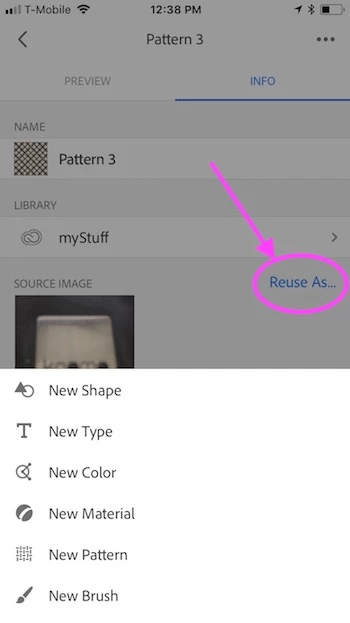
When I clicked on an existing pattern before, and then clicked on Info, I could select Reuse and immediately create another pattern with the same photo. Where is that feature now? I do not want to Edit the existing pattern which seems to be the option.

    This topic has been closed for replies.
    Correct answer Sue Garibaldi

    Artomis.

    I don't see your screenshot, but what version of the app are you using? And what device are you on?

    I'm using the Capture 3.1 on an iPhone and this is what I see.

    Sue.

    1 reply

    Sue Garibaldi
    Community Manager
    Community Manager
    November 21, 2017

    Artomis.

    That function is still in the app but won't show unless your source image is still on the device. Have you by any chance deleted that source image? Or perhaps it didn't save to your device?

    Let me know if the image is there and the option still isn't appearing. (Also let me know which version of the app and your device operating system you're using.)

    Sue.

    artomisAuthor
    Participant
    November 21, 2017

    I was hopeful that that was the answer. But all of my source images are still available. And to test it further, I created one just now with a current image and it says it is no longer available. See the capture below. Where I would have seen my image I now see this little thumbnail and the message. It’s not the same as before.

    Sent from my iPad

    Sue Garibaldi
    Community Manager
    Sue GaribaldiCommunity ManagerCorrect answer
    Community Manager
    November 21, 2017

    Artomis.

    I don't see your screenshot, but what version of the app are you using? And what device are you on?

    I'm using the Capture 3.1 on an iPhone and this is what I see.

    Sue.