


Participant
October 25, 2016
Answered

acrobat causing adobearmhelper error

  • October 25, 2016
  • 2 replies
  • 604 views

I have recently installed Adobe Acrobat XI (v 11.0.06) on my windows 10 pc.  Each time I open up a PDF, I get asked if I would like to have Acrobat be my default app, and after indicating affirmatively, I get this error message:
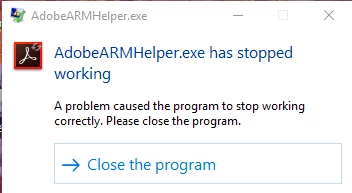
Meanwhile, windows 10 wants to make Edge my PDF viewer, which I "do not want."  Ideas?

thx!

This topic has been closed for replies.
Correct answer kglad

update your acrobat to the last version,  http://www.adobe.com/downloads/updates/

to change app preferences with win 10, Click “System,” then click “Default apps” in the column on the left. Click on any of the program icons to change the associations for the file type or protocol.

2 replies

kglad
Community Expert
kgladCommunity ExpertCorrect answer
Community Expert
October 25, 2016

update your acrobat to the last version,  http://www.adobe.com/downloads/updates/

to change app preferences with win 10, Click “System,” then click “Default apps” in the column on the left. Click on any of the program icons to change the associations for the file type or protocol.

pklocke55Author
Participant
October 25, 2016

I had actually already executed the steps to change the file association after a point, as I needed it to work.  But was more curious as to the cause of the error itself.  But I do appreciate the response!