


September 14, 2016
Question

Acrobat Comparison Does Not Work 11.0.17

  • September 14, 2016
  • 2 replies
  • 435 views

I am trying to compare two distinct PDF documents, both of which are are in the Japanese language.  Each document is ~20 pages, and has verifiable differences, as found with simple human review and using ExamDiff Pro.  When I try to compare these two documents (or any other Japanese documents) I receive the below error:
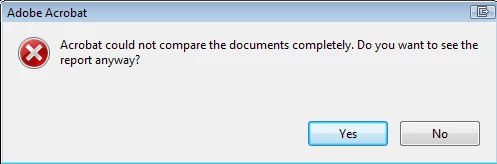
Once the comparison completes, Acrobat says no differences were found between the documents.  We also see this issue in the Japanese GUI version of Acrobat (though I am unsure of the version #)

Has anyone else seen this, and if so, what is the solution -if any?

This topic has been closed for replies.

2 replies

September 14, 2016

I followed Rick Borstein's instruction here but was unable to get it to work.  It is important to note that these documents are not scanned, but are rendered using another piece of software. 

We have found that, when Acrobat exports the non-working documents to MS Word, and are then saved again as PDFs, the comparison works.  Is there an understood reason for that odd workaround?              

September 14, 2016

Testing computer is of the following types:

Windows 7 Professional

4GB RAM

2 Vcpu

40GB disk space

I am going to attempt the same test using a trial of Acrobat DC, to see if the issue is present in the latest release.