


Participating Frequently
April 30, 2018
Answered

Acrobat Javascript: Rating 1-5 represented as % value to gain average

  • April 30, 2018
  • 2 replies
  • 2079 views

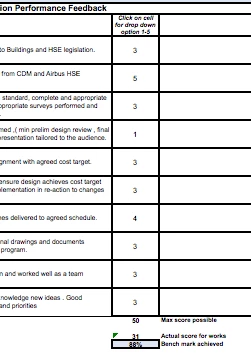
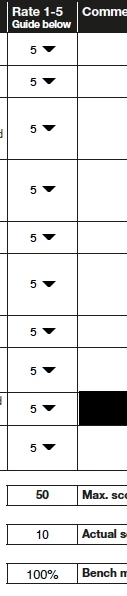
I have a table with 10 rows in an acrobat doc. In one of the columns I need the user to rate the question 1-5. I figured it was easiest to do this with a text field where the user can write 1, 2, 3, 4 or 5. I need to represent these ratings as percentages where: 1=50% 2=75% 3=90% 4=95% 5=100%. At the bottom of the table is a total box where I need the average percentage of the 10 boxes.... any ideas? Im looking to replicate the excel spreadsheet below
This topic has been closed for replies.
Correct answer MatLac10492407

Tried this and now the actual score is appearing as '10' - the number of fields as opposed to the total of the ratings which should be '50'


All in all, "Actual Score" will have this script:

var valSum = 0

var qty = 10

for (var x=1;x<=qty;x++){

var myExpVal = this.getField("Dropdown."+x).valueAsString

var aExpVal = myExpVal.split("-")

valSum += Number(aExpVal[0])

}

event.value = valSum

and "Bench....."  will have this script:

var valSum = 0

var qty = 10

for (var x=1;x<=qty;x++){

var myExpVal = this.getField("Dropdown."+x).valueAsString

var aExpVal = myExpVal.split("-")

valSum += Number(aExpVal[1])

}

valSum /= qty

event.value = valSum

I highligthed the differences between the two

Now the later one doesn't take into account a N/A box.  It will attempt to average all ten fields even if only one is filled.  If you might encounter a situation where the user will not make 10 choices, you need to adjust the second script (the first one only adds 0 to the sum so it is not a problem)

2 replies

Inspiring
April 30, 2018

You can use or a drop down box with export value set to the decimal value of the percentage assigned to choice and a no selection set to 0. The result should be in a text field set to the "Percentage" format. You can then use the "Field is the _____ of the following fields" option and set the action to "average" and then select the specific fields to include in the calculation. Using the "Percentage" format will automatically add the "%" sign and adjust the decimal point for the percentage result display.

Participating Frequently
May 1, 2018

Many thanks this has worked fine and now adds up to the correct % for 'bench mark achieved'.
What I now need to know is how to get the total for 'Actual score for works'.

I've set the format to 'number' and then in 'calculate' - 'value is the sum+ of the following fields' - but rather than adding up the 0-5 rated values it is just adding the amount of fields. So if I have 5 rated in each of the 10 boxes the total should be 50, but is showing as 10. Any ideas?

Inspiring
May 1, 2018

When entering an export value that is different than the value chosen by the user, it is that export value that is returned by the value property.

If you wish to calculate both values, we will have to cheat and create a custom calculate script

name each of your field the same way:  Dropdown.1, , Dropdown.2 , etc

replace each export value with a string representing the association of the value and the export value needed separated by a hyphen "-"

export value = 1-0.5      2-0.75     etc

then, use this script to calulate:

//Declare a variable that will be used to sum

var valSum = 0

//Number of fields to scan

var qty = 10

//Loop through all 10 fields (I assumed you have 10)

for (var x=1;x<=qty;x++){

var myExpVal = this.getField("Dropdown."+x).valueAsString

//Separate value from export value and store them in an array

var aExpVal = myExpVal.split("-")

//Indice [0] for value, [1] for export value, sum eveything

valSum += Number(aExpVal[0])

}

valSum /= qty  //Remove this part if you want sum not average

event.value = valSum

Inspiring
April 30, 2018

You should use dropdown list instead as you can set values of 1 to 5 as well as exportValues 50 to 100 as you mentionned.

Then, your script would calculate the average between the exportValues and add "%" to the final string.