Participant
July 1, 2016
Question

Acrobat - Office 2010 problem

  • July 1, 2016
  • 1 reply
  • 1859 views

Hi, I am currently using Adobe Acrobat v11.0.16 (latest update) with Office 2010 on Window 8.1

When right-clicking on a word document (or any office document) and selecting 'Convert to PDF' i am presented with the error below:

Additionally i like to use 'Action Wizard' in Adobe to run batch conversions of word documents to PDF (this no longer works either)
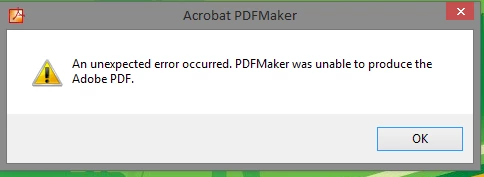
Having read through many forums, i have taken all suggested actions incl.

  • Re-installing and repairing office 2010 several times
  • Re-installing and repairing Acrobat XI several times (also using Acrobat removal tool)
  • Checking registry settings etc.

Acrobat toolbars are present in all the Office Applications and work correctly, printing to pdf from within an office application works perfectly. So it seems that whenever Acrobat (PDFMaker)is calling an external Office application either from the explorer context menu or from Acrobat itself it is failing.

I have been able to test this on other PC's and user accounts but i am still getting the same result. I suspect this could be an issue arising maybe from a windows or office patch or change of permissions as this was working some weeks and months ago.

Additionally i also tried using the trial version of Acrobat DC as a fresh install however i received the same error, and when trying to do the same with excel documents it tells me the the following error:
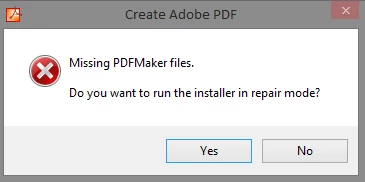
Naturally i run repair mode and it does its thing but i still end up with the original PDFMaker error.

I hope i have included enough detail as I rely on this functionality and would great if i could get a resolution to this issue.

Thankyou

This topic has been closed for replies.

1 reply

Adorobat
Participating Frequently
July 1, 2016

Hi jc58895878 ,

Please perform below mentioned steps:

1- Check if there any updates available for MS Word.

2 -Check if MS Word is there under Preferences, open Acrobat>Edit>Preferences>Convert to PDF>Microsoft Office Word.

3-Try to reregister Context menu,hit start>type cmd>right click cmd and click Run as Administrator>

    For 32 bit OS - type - regsvr32 "C:\Program Files\Adobe\Acrobat 11.0\Acrobat Elements\ContextMenu.dll"

    For 64 bit OS - type - regsvr32 "C:\Program Files (x86)\Adobe\Acrobat 11.0\Acrobat Elements\ContextMenu.dll"

                                       regsvr32 "C:\Program Files (x86)\Adobe\Acrobat 11.0\Acrobat Elements\ContextMenu64.dll"

                                       regsvr32 "C:\Program Files (x86)\Adobe\Acrobat 11.0\Acrobat Elements\ContextMenuShim64.dll"

    After reregistering ,reboot the computer and see if it works.

4- If step 3 doesn't work . please visit these link : Troubleshoot Acrobat PDFMaker issues in Microsoft Office on Windows


    Fix PDFMaker unavailability in MS Office     

Let us know about the results.

Thank You!

Shivam         

Participant
July 3, 2016

Hi Adoro,

I appreciate you getting back to me on this. Unfortunately none of the items suggested has made any difference to my issue. To further add to testing we have done a clean install of windows 8.1 on a different machine with a fresh install of Office 2013 and Acrobat DC and still received the same error.

In addition i have also tested other machines that are still running Windows 7 and Office 2010 with Acrobat XI and they are receiving same issue. It seems odd that nothing has really changed with the Adobe software and for some reason its ability to utilize Office externally from Acrobat or right-click Context menu is now not functioning and not localised to one PC.

Is it possible now that we can consider that this may have caused by a windows/office update?

Cheers

Joel

Adorobat
Participating Frequently
July 4, 2016

Hi ,

Try to install Acrobat XI and when installed , check if there any updates available for Acrobat.

Check if you are able to see the pop-up message "Creating Adobe PDF Printer" during installation.

Thank You!