
Participant
October 25, 2023
Answered

Acrobat Pro Customise Toolbar does not work.

  • October 25, 2023
  • 2 replies
  • 2679 views

New Acrobat, new problems.

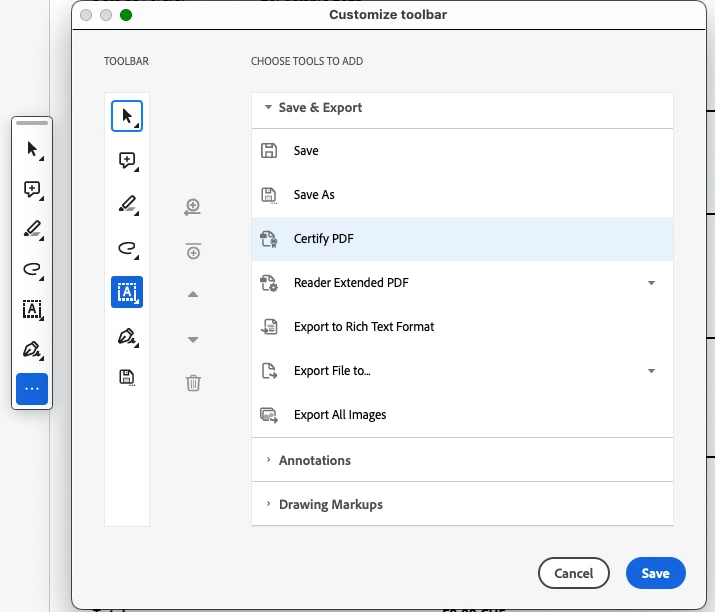
I cannot delete any of the given icons (all commands are grey) and was only able to add an icon after moving the toolbar from its standard position - but not place the icon where I want it.

I cannot replace the Toolbar permanently in a position which would be less disturbing for work (like top menu bar).

What's this, Acrobat? Are you identifying as Facebook and deciding what your user wants over its head?


This topic has been closed for replies.
Correct answer JR Boulay

You must revert to the Classic UI: https://community.adobe.com/t5/acrobat-discussions/acrobat-2023-how-to-revert-to-classic-gui-user-interface/td-p/14052807

Consider the new Acrobat as a beta version, many features are missing or half-implemented.

2 replies

JR Boulay
Community Expert
JR BoulayCommunity ExpertCorrect answer
Community Expert
January 23, 2024

You must revert to the Classic UI: https://community.adobe.com/t5/acrobat-discussions/acrobat-2023-how-to-revert-to-classic-gui-user-interface/td-p/14052807

Consider the new Acrobat as a beta version, many features are missing or half-implemented.

Acrobate du PDF, InDesigner et Photoshopographe
leed93541571
Inspiring
May 23, 2024

Would be nice if it didnt just auto update to 'Beta' Versions

Bernd Alheit
Community Expert
Community Expert
October 25, 2023

What API of Acrobat does you use?

svhkAuthor
Participant
October 25, 2023

2023.006.20360
Changed overnight (and behind my back)

Bernd Alheit
Community Expert
Community Expert
October 25, 2023

Try the forum for Adobe Acrobat.