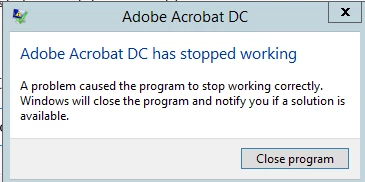
This topic has been closed for replies.
Correct answer Meenakshi_Negi

Hi MaxFastenal

Try "Repair Installation" under Help menu in application

Also Refer the troubleshooting steps provided in this KB doc : Troubleshoot Windows system errors, freezes | Adobe software  and check if it helps.

Could you please confirm the dot version of Adobe Acrobat Pro DC and OS you are using.

Do you experience this issue only while using comment tools?

Please share the exact workflow you do when you experience this issue.

Regards,

Meenakshi

1 reply

October 14, 2016

This one pops up constantly as well

Meenakshi_Negi
Meenakshi_NegiCorrect answer
Legend
October 14, 2016

Hi MaxFastenal

Try "Repair Installation" under Help menu in application

Also Refer the troubleshooting steps provided in this KB doc : Troubleshoot Windows system errors, freezes | Adobe software  and check if it helps.

Could you please confirm the dot version of Adobe Acrobat Pro DC and OS you are using.

Do you experience this issue only while using comment tools?

Please share the exact workflow you do when you experience this issue.

Regards,

Meenakshi

October 14, 2016

I have attempted the "Repair Installation" and it runs until it says 1 minute left and disappears. I'm not sure if it's completing or not, but it doesn't acknowledge completion and I see no change in the issue.

We are using acrobat  Pro DC 2015.006.30243

I'm running windows 7 and using a remote connection. (though only some have remote connection and the issues seem to be the same for all.)

The comments screen is the most pronounced issue. If I open it just select some text, the error pops up and the program closes. There have also been issues with saving adding signatures and the edit pdf tab tools. These tools account for 90% of my use of the program and There could be other items that I just haven't come across.

When I encounter the "has stopped working" error message I am given no choices. The program closes.

The internal error message I can sometimes get around and continue to perform other tasks, but not the one I am attempting to complete.