
Known Participant
July 11, 2016
Question

Acrobat Pro DC no longer converts jpg files

  • July 11, 2016
  • 2 replies
  • 472 views

Using Pro DC  (latest version) on Mac OS 10.11.5. Just last week, I was able to use it to convert a jpg to a pdf, but it looks like now there has been an update that no longer supports this. I get the following error:
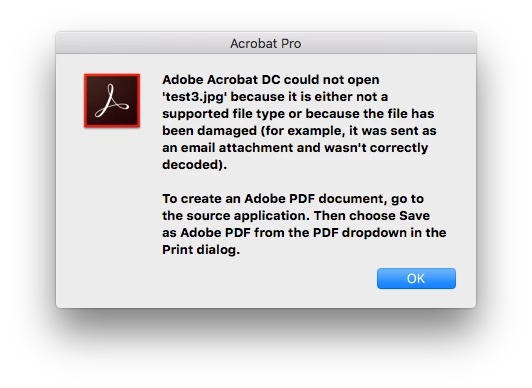
I've opened the file in PhotoShop and resaved as a jpg to just to eliminate any corruption issues, that didn't change anything. Sure, I could save directly to PDF out of PS, but I have to combine multiple PDF & JPG files on a regular basis into a single PDF, so resaving out of PS is not an option. Am I missing something?

This topic has been closed for replies.

2 replies

redreadiva
Participant
July 22, 2016

I just figured it out. I did the same steps as you - combined 3 jpgs into one pdf. Then I selected "edit pdf" or "edit text and imgs" (both worked). After the text and images were separated out, the "add image" button appears in your dock above.

Legend
July 11, 2016

Are you using Open or Create?

saldaAuthor
Known Participant
July 12, 2016

Initially, was using File->Create->Combine Files Into a Single PDF. Then I tried just opening the jpg file.

Also, was able to try this on my desktop iMac at work and everything seemed to work as is, so it seems to be something with just my MacBook Pro. I'm going to try to uninstall and reinstall to see if that fixes the issue, unless anybody has a less destructive fix.