


anerjan
Participant
December 14, 2016
Question

Acrobat SDK 10 bookmark creation edit mode

  • December 14, 2016
  • 1 reply
  • 817 views

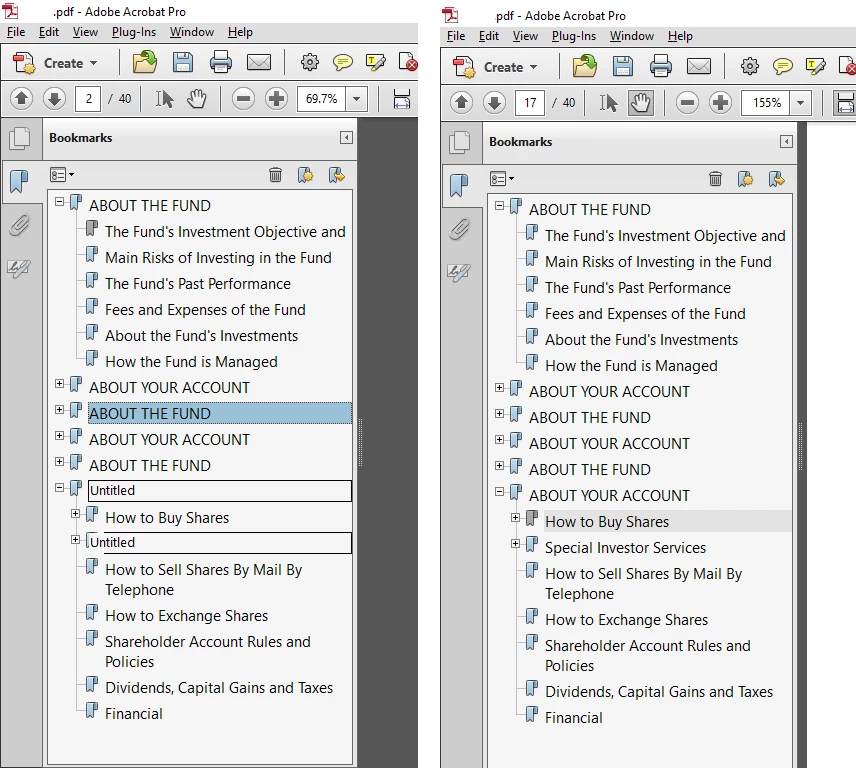
I have a acrobat plugin which creates bookmarks based on some criteria. I'm facing an abnormal behavior in acrobat 10. bookmarks are created correctly but if ran the same code again and again the bookmark tree gets distorted. some of the newly created bookmarks show the Edit mode rectangle on them which goes away if I click here and there in the tree. is there any way to refresh the bookmark pane so that bookmarks can render correctly. I'm using the standard call to create bookmarks like PDBookmarkAddNewChild and PDBookmarkAddNewSibling.

navigating in the tree with arrow keys or pressing the escape key removes the rectangle and the original heading shows up.
This topic has been closed for replies.

1 reply

lrosenth
Adobe Employee
Adobe Employee
December 14, 2016

Given that Acrobat X is no longer supported – are you seeing the same problems in Acrobat XI or DC?

anerjan
anerjanAuthor
Participant
December 15, 2016

this plugin is targeting Acrobat X only . the only problem I'm facing is this behavior other than this a large number of functionalities are working fine, can not just upgrade acrobat version for the sake of this single bug. I have seen the same behavior in acrobat 8. what is causing some of the bookmarks to remain in edit mode ? under the "Untitled" rectangle the original heading is hiding which shows up after getting refreshed. This distortion is also removed if I save and close the file and reopen it.

lrosenth
Adobe Employee
Adobe Employee
December 15, 2016

I understand and appreciate that -= but as support for Acrobat X ended over a year ago (https://blogs.adobe.com/documentcloud/adobe-acrobat-x-and-adobe-reader-x-end-of-support/), I don’t have much to add. If there is a bug in the software, the only option is upgrade or find your own workaround.