
Question
Acrobat XI PRO: Create a Table of Contents (TOC) automatically in top, after I have combined several pdf.files into a single pdf.file
Hey
I have now tried for hours, but now I give up!
MY WISH -
Create a Table of Contents (TOC) automatically after I have combined several pdf.files into a single pdf.file.
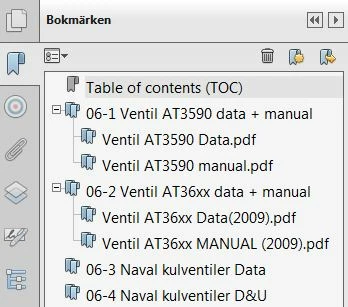
I have already bookmarks, shown on the screen (see screenshot below) but I want those bookmark to be visualised in a separate TOC in the top of the combined files.
This new TOC (which I have inserted) shall be printable and serve as a cover page in a binder.
I have seen other cheap pdf.programs in the market (e.g. PDF Converter Professional 7.3) which are able to make the above things, easy, fast and nice.
Regards
Ole Bünger, Kristianstad Sweden
 AdChoices