
June 13, 2016
Answered

Acrobat XI Pro - Import Pdf When Using Dropdown List

  • June 13, 2016
  • 1 reply
  • 1045 views

Hello Adobe community,

Warning: Beginner here

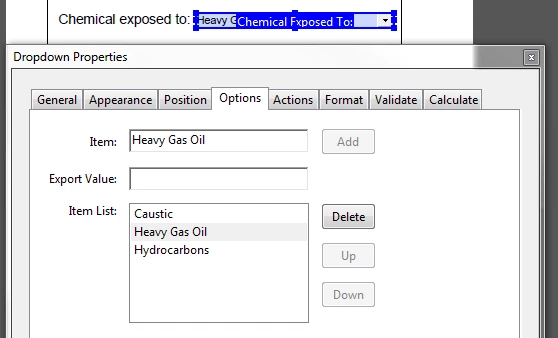
I am trying to import an existing pdf after the user has selected an item on the drop down list. For example; I have a form with a dropdown menu and three items on the list (caustic, heavy gas oil, and hydrocarbon). Each item on the list has its own PDF that needs to be imported into the document if selected. Once the user has chosen from the list I need to import a pdf into the existing document. I have done some basic searches but found no luck.

Any advice or tutorials I can research will be appreciated.

Thank you
This topic has been closed for replies.
Correct answer try67

Again, it's tricky. You can show/hide entire pages by converting them to Templates and then changing the value of their hidden property, but this would only work in Acrobat. In Reader you will need to convert the pages to Templates, hide them and then use a script to spawn them when you want to show them and then delete them when you want to hide them once more. Possible, but not simple to implement.

1 reply

try67
Community Expert
Community Expert
June 13, 2016

This is problematic. First of all, it won't work in Reader, and in Acrobat it can work, but requires installing a script on the local machine. Also, the paths of the files to import must be known in advance, either the full file path or relative to the current document.

On top of that, what if the user changes their minds and changes their selection? You could end up with multiple copies of each file attached to the main one.

June 13, 2016

Thanks for the response, also I am using Acrobat XI. The goal for this document would be for others to use it as well. So you are right it would be a mess to match all the paths of the files. I am now thinking of importing all the pages into the document and hiding/unhiding it when selected inside the dropdown menu?

try67
Community Expert
try67Community ExpertCorrect answer
Community Expert
June 13, 2016

Again, it's tricky. You can show/hide entire pages by converting them to Templates and then changing the value of their hidden property, but this would only work in Acrobat. In Reader you will need to convert the pages to Templates, hide them and then use a script to spawn them when you want to show them and then delete them when you want to hide them once more. Possible, but not simple to implement.