


Question
Active script SUBMIT FORM botton for URL (server)
In a personalised SUBMIT FORM botton I've to enter an ACTIVE SCRIPT with the URL of the server (in my case it's SharePoint Foundation 2013, with a "workspace name" and a "document library") -> see the "Submit Form Selections":
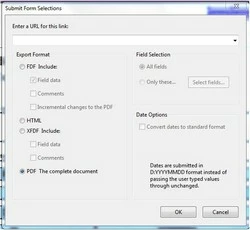
I want that a copy of the form will be saved in the SharePoint Workspace.
Example:
URL: https://abc.workshare.com/mypage
Workspace name: All-Operations
Dokument library: Reports
All together: https://abc.workshare.com/mypage/all-operations/reports/
An export in the "PDF Form" forum explained me, that this must be an ACTIVE SCRIPT.
Someone could write for me the ACTIVE SCRIPT?
Thank you very much.
 AdChoices