


October 10, 2016
Answered

"Add a link" box needs to be recalibrated

  • October 10, 2016
  • 1 reply
  • 687 views

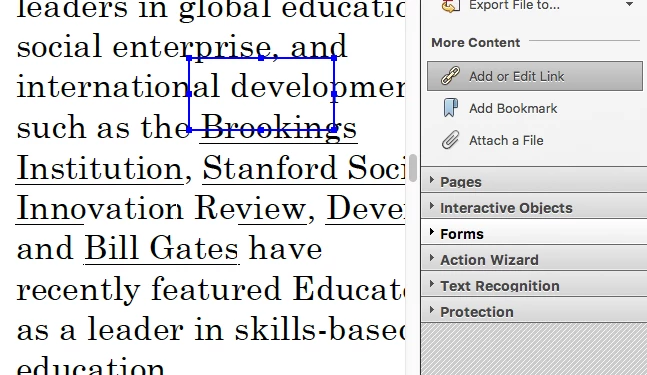
I am using Adobe Acrobat Pro on my MacBook Pro and it has stopped making exact boxes around my chosen text when I try to insert links. Is there a way to reset/recalibrate the add link function? In the photo below: I tried to drag the box over the word 'Brookings,' but it's way off.

Thanks!
This topic has been closed for replies.
Correct answer try67

Go to View - Show/Hide - Rulers&Grids and tick off "Snap to Grid".

1 reply

Bernd Alheit
Community Expert
Community Expert
October 11, 2016

Select the word and choose "Create Link...".

October 11, 2016

Thanks for your help. I know how to create a link, but when I try to make the box around the words to create link, the box isn't accurate.

try67
Community Expert
try67Community ExpertCorrect answer
Community Expert
October 11, 2016

Go to View - Show/Hide - Rulers&Grids and tick off "Snap to Grid".
