


Inspiring
January 28, 2016
Answered

add open file when combining pdfs

  • January 28, 2016
  • 2 replies
  • 1121 views

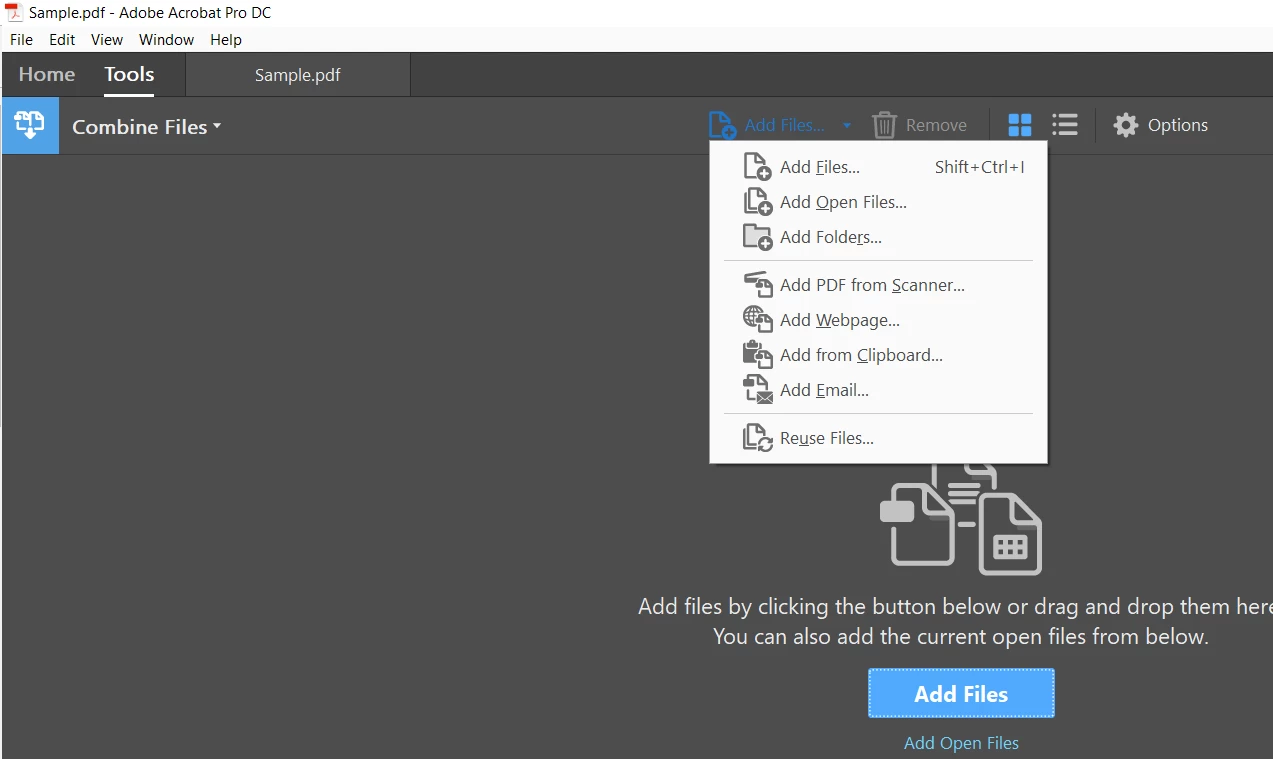
Before Acrobat DC, I was able to go to the Combine Files dialog box, and one of the choices was "Add Open Files". In Acrobat DC, "Add Open Files" is not in the Add Files drop down list. Was this command removed from Acrobat DC?
This topic has been closed for replies.
Correct answer Tariq Ahmad

Hello,

Sorry for the delay in response.

The option Add Open files is still available in Acrobat DC. File>Create>"Combine Files into a Single PDF"

Please check the screenshot attached. The option "Add Open Files" only be active when you have files open in Acrobat.

-Tariq Dar

2 replies

Tariq AhmadCommunity ManagerCorrect answer
Community Manager
May 9, 2018

Hello,

Sorry for the delay in response.

The option Add Open files is still available in Acrobat DC. File>Create>"Combine Files into a Single PDF"

Please check the screenshot attached. The option "Add Open Files" only be active when you have files open in Acrobat.

-Tariq Dar

Luke Jennings
Inspiring
January 29, 2016

The Acrobat DC default preference is to show open PDFs tabs in the same window. If you go to Preferences> General> Open documents as new tabs in the same window, (need to Quit Acrobat) and un-check the preference, the Add Open Files option will appear.

milosp23498871
Participant
April 3, 2018

can you please tell me how do you combine files without saving them previously?when I click combine it leaves the app and open the browser. only option available that I have is choose from saved files. I am using windows.

thank you 

Luke Jennings
Inspiring
April 3, 2018

I'm not on windows, but you can try going to Preferences> General> Show online storage when opening files (turn off).