
bastians9078424
Participant
August 6, 2019
Answered

Adding a signature causes a 'Link Annotation Modified'

  • August 6, 2019
  • 1 reply
  • 3145 views

Hello,

If I have a document which pages are indexed and I add 2 DidSig signature on an indexed page, I get a 'Annotation Modified' on the Signature panel (left side):
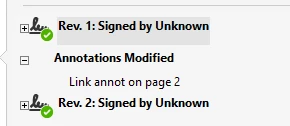
The signature was newly added, no other change. Is this normal, is there a way around it?

Thanks

~Bastian

This topic has been closed for replies.
Correct answer lrosenth

Since the first signature is an approval signature and not a certifying signature, we warn viewers that the document has been modified and why. This is a GOOD THING…

If you don’t want this, then use a certifying signature the first time on a document to declare the rights.

1 reply

lrosenth
Adobe Employee
Adobe Employee
August 6, 2019

Can you post the PDF in question so we can examine it?

bastians9078424
Participant
August 7, 2019

Sure, here is a simple document showing this behavior: Word document with table of content, converted to PDF with Acrobat Pro DC on Windows 10, then signed with 'iSign Solutions' Sign-it plug-in (formerly CIC).

Thanks so much for looking into this.

Don't know how to upload a document on this forum, but here is the dropbox link:

Dropbox - Adobe Case example document.pdf - Simplify your life

Hope this works, let me know

~Bastian

lrosenth
Adobe Employee
lrosenthCorrect answer
Adobe Employee
August 8, 2019

Since the first signature is an approval signature and not a certifying signature, we warn viewers that the document has been modified and why. This is a GOOD THING…

If you don’t want this, then use a certifying signature the first time on a document to declare the rights.