
rasmusikar
Participant
May 19, 2016
Answered

Adding custom .js file for it to work in Adobe Reader (without the pro version)

  • May 19, 2016
  • 2 replies
  • 4770 views

I have created a PDF form using Acrobat Pro X, in order to use a few restricted functions I created a .js file and included all those functions as trusted functions.

To use these functions I placed this .js file in the Javascripts folder on my system.

But I don't see such a folder on systems with only Adobe reader, instead I see a folder named "JSCache" it doesn't show any .js files in it and if I place my custom .js file in it my form doesn't work properly.

Please guide me in this regard. The following screen might come in handy.
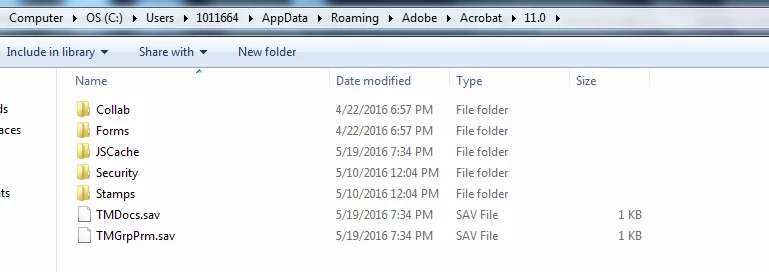
Thanks

This topic has been closed for replies.
Correct answer George_Johnson

You shouldn't be doing anything with the JSCache folder. Leave it alone and add the "Users\(username)\AppData\Roaming\Adobe\Acrobat\Privileged\10.0\JavaScripts" folder, or whatever it is for the Reader version you're using. The point is you have to manually create the Privileged folder and the two other folders underneath it.

2 replies

Inspiring
May 19, 2016
rasmusikar
Participant
May 19, 2016

Thanks for the response George, but I don't have that privileged folder on my system at the location mentioned in that document.

Inspiring
May 19, 2016

Then you need to first create the "privileged" folder, then version number folder, and then the "JavaScripts" folder. You cannot create them in one shot.

If you have both Acrobat and Reader installed, they share the privileged\version\JavaScript folder so if you have folder level scripts for Acrobat you may need to code to those JS files so the code does not run when Reader is opened. I also add a folder named "JavaScriptsNotUsed" to hold JavaScript files I do not want to run or I am developing. This folder allows me to move files from the JavaScripts folder and prevent them being run when Acrobat/Reader starts.

Karl Heinz  Kremer
Community Expert
Community Expert
May 19, 2016

If the JavaScripts directory does not exist, you will have to create it.

rasmusikar
Participant
May 19, 2016

Thanks for the reply khkremer but that doesn't help. I checked in the JSCache and found this;

George_JohnsonCorrect answer
Inspiring
May 19, 2016

You shouldn't be doing anything with the JSCache folder. Leave it alone and add the "Users\(username)\AppData\Roaming\Adobe\Acrobat\Privileged\10.0\JavaScripts" folder, or whatever it is for the Reader version you're using. The point is you have to manually create the Privileged folder and the two other folders underneath it.