


Adding (failing to add) a toolbar button in Acrobat DC Pro 15.02
Greetings,
I created a working menu item that removes, or scalps (as my user calls it), the first page of a pdf.
I am attempting to add this as a toolbar button.
Following the documentation, I wrote the following code, which I added in the Javascript folder of Acrobat DC Pro (15.02020039).
I ensured that my jpg used for the icon is 20x20. The dummy pdf is just my business card.
I placed both the jpg for the icon and the dummy pdf in the Javascript folder.
I added all this here for your convenience: AddButton - Google Drive
When I start Acrobat, nothing happens, in terms of having my button anywhere under 'Tools'.
Being this is my first button... I beg for some guidance 
Here's the code I have:
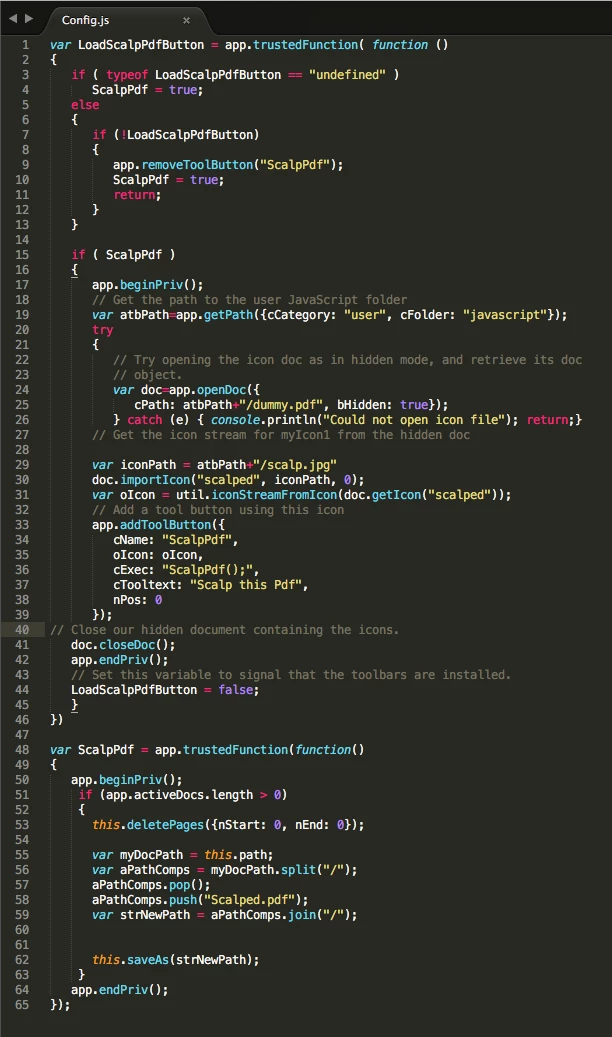
var LoadScalpPdfButton = app.trustedFunction( function ()
{
if ( typeof LoadScalpPdfButton == "undefined" )
ScalpPdf = true;
else
{
if (!LoadScalpPdfButton)
{
app.removeToolButton("ScalpPdf");
ScalpPdf = true;
return;
}
}
if ( ScalpPdf )
{
app.beginPriv();
// Get the path to the user JavaScript folder
var atbPath=app.getPath({cCategory: "user", cFolder: "javascript"});
try
{
// Try opening the icon doc as in hidden mode, and retrieve its doc
// object.
var doc=app.openDoc({
cPath: atbPath+"/dummy.pdf", bHidden: true});
} catch (e) { console.println("Could not open icon file"); return;}
// Get the icon stream for myIcon1 from the hidden doc
var iconPath = atbPath+"/scalp.jpg"
doc.importIcon("scalped", iconPath, 0);
var oIcon = util.iconStreamFromIcon(doc.getIcon("scalped"));
// Add a tool button using this icon
app.addToolButton({
cName: "ScalpPdf",
oIcon: oIcon,
cExec: "ScalpPdf();",
cTooltext: "Scalp this Pdf",
nPos: 0
});
// Close our hidden document containing the icons.
doc.closeDoc();
app.endPriv();
// Set this variable to signal that the toolbars are installed.
LoadScalpPdfButton = false;
}
})
var ScalpPdf = app.trustedFunction(function()
{
app.beginPriv();
if (app.activeDocs.length > 0)
{
this.deletePages({nStart: 0, nEnd: 0});
var myDocPath = this.path;
var aPathComps = myDocPath.split("/");
aPathComps.pop();
aPathComps.push("Scalped.pdf");
var strNewPath = aPathComps.join("/");
this.saveAs(strNewPath);
}
app.endPriv();
});
Thank you for your advice.
 AdChoices