


Participant
December 20, 2017
Answered

Addition with negative numbers in a form

  • December 20, 2017
  • 2 replies
  • 1582 views

Hello, I am trying to add a column of positive and negative numbers on an electronically created form as shown below:
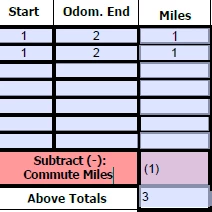
For some reason, the "Above Totals" field is treating the negative as a positive number, resulting in a total of 3 instead of 1. Once I finish typing in the next row; however, the field correctly treats the negative as a negative number as it should be calculated:
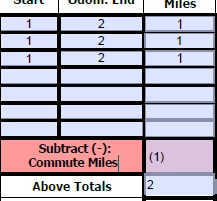
There seems to be some type of delay with this calculation that does not get corrected  until the user manually enters an additional piece of data. Is there a reason why this calculation is not happening automatically? Thanks so much.

This topic has been closed for replies.
Correct answer Thom Parker

Usually, when calculations seem delayed by an entry it is a calculation order issue.  One calculated field depending on another, but the first field is calculated after the second. Do you have calculations that depend on each other for this result?

2 replies

Bernd Alheit
Community Expert
Community Expert
December 20, 2017

Check the calculation order of the form.

Thom Parker
Community Expert
Thom ParkerCommunity ExpertCorrect answer
Community Expert
December 20, 2017

Usually, when calculations seem delayed by an entry it is a calculation order issue.  One calculated field depending on another, but the first field is calculated after the second. Do you have calculations that depend on each other for this result?

Thom Parker - Software Developer at PDFScriptingUse the Acrobat JavaScript Reference early and often
Thom Parker
Community Expert
Community Expert
December 20, 2017

To Set the calc order. Put the form in "Prepare Form" mode, then select "Calculation Order" from the menu displayed by clicking on the button shown below.

Thom Parker - Software Developer at PDFScriptingUse the Acrobat JavaScript Reference early and often