July 22, 2016
Question

Adobe Distiller Crashing

  • July 22, 2016
  • 1 reply
  • 2894 views

I print a lot of shipping labels through eBay.
For the past 2 years I haven't had any issues simply saving the labels as a pdf, then printing them out.

Just last week, something is wrong with my adobe.

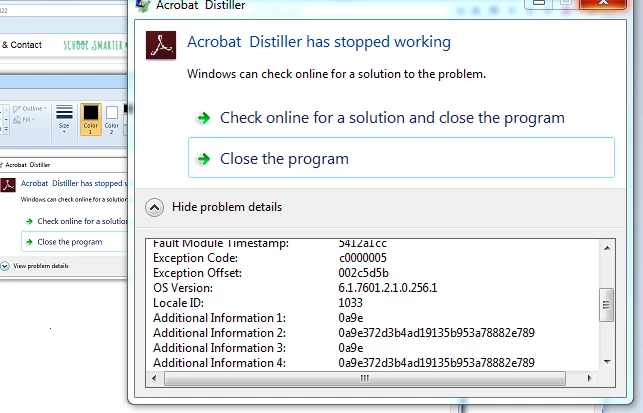
I can't save the labels as pdf anymore - every time i try, Adobe Distiller crashes. See below image.

Full error details:

Problem signature:

  Problem Event Name:    APPCRASH

  Application Name:    AcroDist.exe

  Application Version:    11.0.7.79

  Application Timestamp:    536b6f17

  Fault Module Name:    AcroDistDLL.dll

  Fault Module Version:    11.0.9.29

  Fault Module Timestamp:    5412a1cc

  Exception Code:    c0000005

  Exception Offset:    002c5d5b

  OS Version:    6.1.7601.2.1.0.256.1

  Locale ID:    1033

  Additional Information 1:    0a9e

  Additional Information 2:    0a9e372d3b4ad19135b953a78882e789

  Additional Information 3:    0a9e

  Additional Information 4:    0a9e372d3b4ad19135b953a78882e789

Not sure what to do, would appreciate assistance. I've tried uninstalling and reinstalling Adobe several times.

Temporary workaround has been to save the labels as images, but this is not optimal...I can still open PDFs fine, I just can't seem to "create"? or save them from eBay.
This topic has been closed for replies.

1 reply

Adorobat
Community Manager
Community Manager
July 22, 2016

Hi jhillman87 ,

Could you please tell what application you are using to create pdf from- Web Browser/MS Word or other application?

Is this happening with a single file or with all of them?

Try to repair Acrobat , open Acrobat>navigate to Help>Repair Installation

Let us know if it worked.

Thank You!
Shivam

July 22, 2016

Hello,

I am attempting to create the PDFs directly from web browser (Firefox, although I tried Chrome also)

If you are familiar with the eBay shipping label generator, it creates the label in the browser - I am then "Printing" it to Adobe PDF, which allows me to save it on my desktop.

As soon as I select Print to Adobe PDF, the distiller crashes - so this happens with all print-to-adobe from web browser.
I tried 4-5 different shipping labels, so it is not just 1 label but all print-to-adobe that I try to do.

I'll try to do a repair later when I'm home from work, but I imagine this won't do much more than the full reinstalls I did? (I went to control panel -> programs -> uninstalled Adobe, and did a fresh reinstall... Twice.)

July 22, 2016

Here's a photo for better clarification.

After the label is generated on web browser, I click "Print Label" and select Adobe PDF.

Once I click OK, it will ask me where I want to save the .pdf (I select my desktop) and then Distiller crashes.

I've done this with over 1000 labels in the past few years without issues, so I'm assuming it's something recent causing this issue...