Participant
October 18, 2016
Answered

Adobe PDF readers crash with PDFs containing transparent bitmaps

  • October 18, 2016
  • 2 replies
  • 747 views

Dear forum,

I have following problem with only Adobe PDF readers on all platforms regarded the PDF file available on http://www.andrijar.com/pumpd/pump.pdf. The file causes Adobe products to crash because it contains several SVG images with transparent PNG bitmaps, and it seems that those transparent PNG bitmaps are fatally noxious for Adobe products, while all other available readers show them quite correctly, like Sumatra, Nitro PDF, etc. The PDF is perfectly correct obtained from the fully correct XPS source and there is no viable explanation for such strange behavior of virtually all Adobe products.

Please help me to surpass this problem.

Sincerely,

Dipl.-Ing. Andrija Radovic

http://www.andrijar.com

[Personal info removed by Mod]

This topic has been closed for replies.
Correct answer AadeshSingh

Hi andrijar76575077​,

We replicate the issue at our end and seems to be the issue with the document. Due to which you are experiencing issue while opening it in Acrobat/Reader.

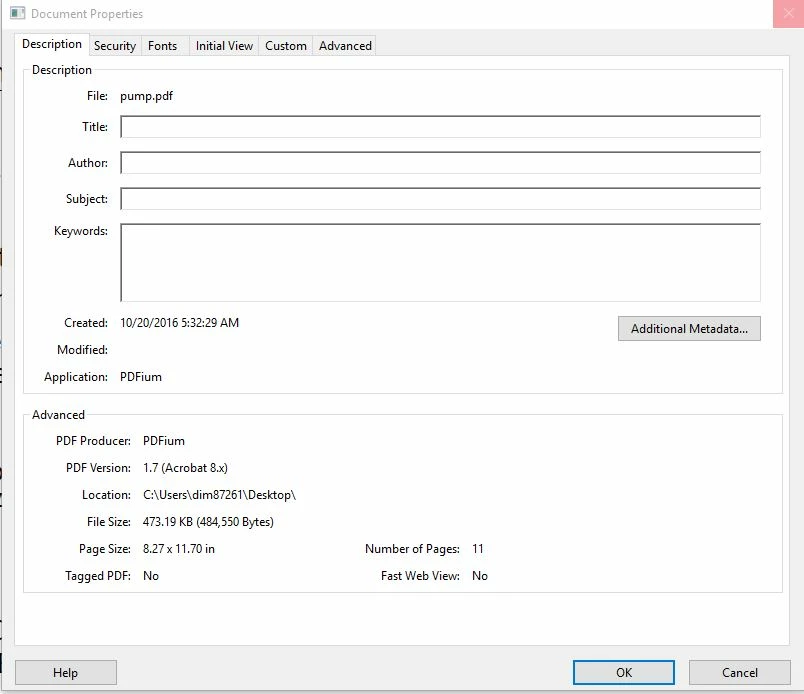
PDF is not created using a supported PDF producer/application that is causing Acrobat/Reader application to crash. Please check attached screenshot of the document properties.

Please re-create the PDF file using Acrobat application to make sure you don't experience any such issue.

Regards,

Aadesh

2 replies

Adobe Employee
April 13, 2017

With the latest release of Acrobat on 11th April 2017, this issue has been addressed.

To get the latest product update, within the product, click on the menu Help-> Check for updates.

AadeshSingh
Community Manager
AadeshSinghCommunity ManagerCorrect answer
Community Manager
October 20, 2016

Hi andrijar76575077​,

We replicate the issue at our end and seems to be the issue with the document. Due to which you are experiencing issue while opening it in Acrobat/Reader.

PDF is not created using a supported PDF producer/application that is causing Acrobat/Reader application to crash. Please check attached screenshot of the document properties.

Please re-create the PDF file using Acrobat application to make sure you don't experience any such issue.

Regards,

Aadesh