
Participating Frequently
October 19, 2017
Answered

align horizontally text field in acrobat

  • October 19, 2017
  • 1 reply
  • 2392 views

Hello everybody. Is there any way to align a line of a text field horizontally, and then, when you press enter, the two lines of text are both horizontally aligned as well? please check this image, to make it more clear.
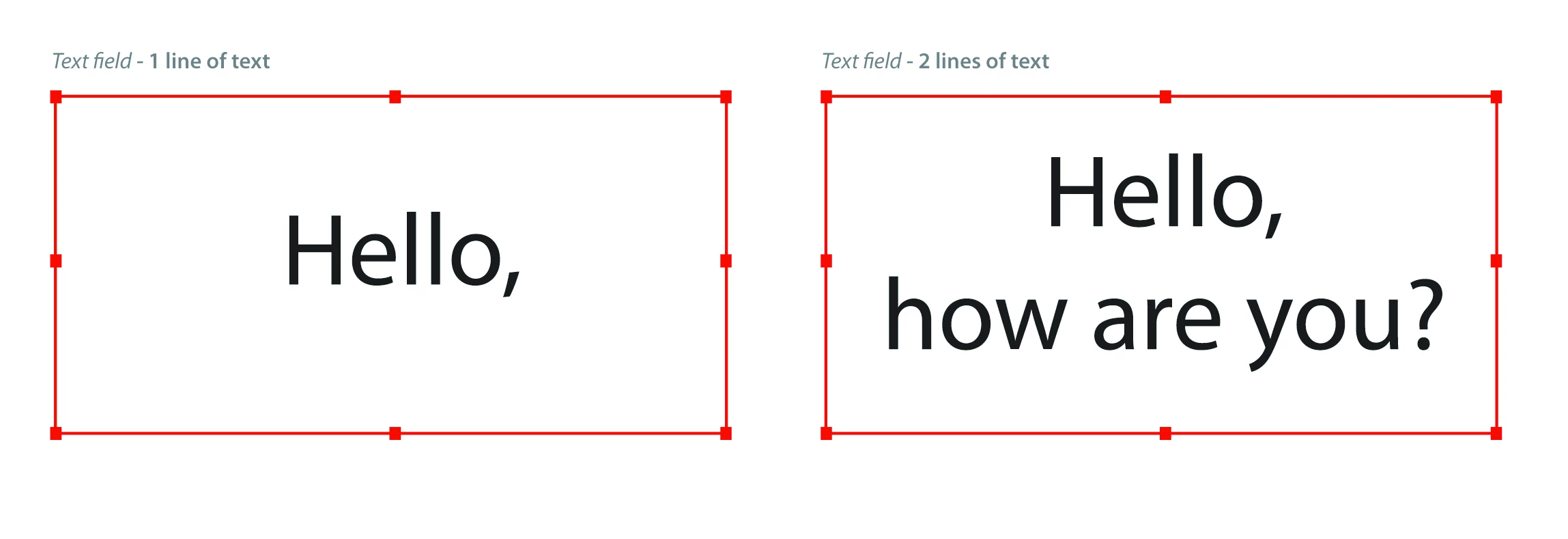
    

Maybe some javascript code to solve it?

thanks!

This topic has been closed for replies.
Correct answer Joel Geraci

If you allow rich text formatting, a user can select the text in the field and then use the properties toolbar to format the selection to vertically center but you can't force them to do so. If you enter a value (not a default value) and do the formatting for them, they can edit it and your formatting will "stick" however, the formatting will get reset if they clear the form.

In short, it can be done but can't be enforced.

1 reply

Joel Geraci
Community Expert
Community Expert
October 19, 2017

No need for JavaScript. Just set the field Options to align center and multiline.

If you were thinking of having them also center vertically in the field height... No. It can't be done... even with JavaScript.

Participating Frequently
October 19, 2017

yes, i mean center the height field...

Joel Geraci
Community Expert
Joel GeraciCommunity ExpertCorrect answer
Community Expert
October 20, 2017

If you allow rich text formatting, a user can select the text in the field and then use the properties toolbar to format the selection to vertically center but you can't force them to do so. If you enter a value (not a default value) and do the formatting for them, they can edit it and your formatting will "stick" however, the formatting will get reset if they clear the form.

In short, it can be done but can't be enforced.