
An error occurred during the submit process. Cannot process content type text/html; charset=utf-8
Hi all,
I am seeing the following error when submitting a pdf:
"An error occurred during the submit process. Cannot process content type text/html; charset=utf-8"
The error is only occuring on a couple of client machines and most machines are successfully displaying an html page on submission.
I am using the lastest version of adobe reader when trying to submit.
When using fiddler everything seems fine with the submission and response.
I think Adobe Reader is recieving the html response correctly, but doesn't know how to handle it and I am not sure why.
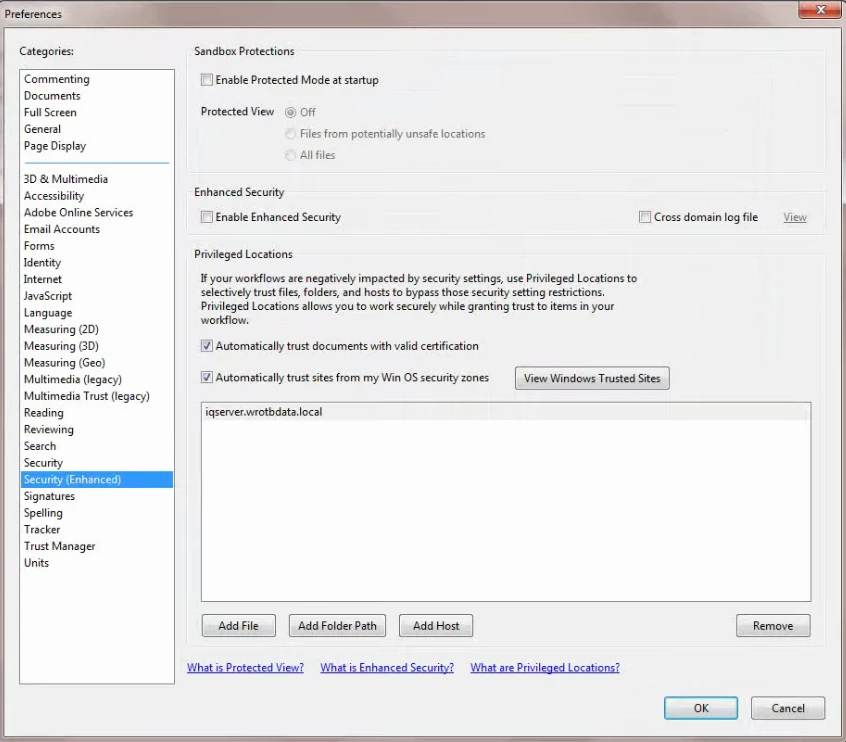
I suspected the issue may be a permissions issue. I've tried adjusting every setting I could find in the secruity (enhanced) settings, but nothing has worked. I've attached an image of the current security (enhanced) settings.
Does anyone know what may be causing this issue or have any suggestions on what I could try next?
Thanks,
mklingberg1


 AdChoices