


Participant
September 30, 2016
Question

Append to document using DWF

  • September 30, 2016
  • 1 reply
  • 468 views

Hi all

I am trying to append a DWF to a PDF document and keep getting 'Unknown Format' error, as I guess Acrobat Pro is trying to convert the DWF before appending.

Could do with some guidance if anyone can assist, it would be most appreciated.
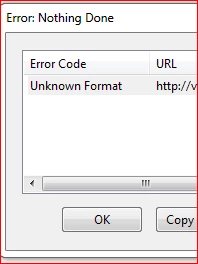
Thanks

GW

This topic has been closed for replies.

1 reply

Karl Heinz  Kremer
Community Expert
Community Expert
September 30, 2016

Which version of Acrobat are you running, and on what operating system? Can you convert the DWF file to PDF by just selecting File>Create>PDF From File? Are you getting any errors when doing this?

JGW2Author
Participant
September 30, 2016

Windows 7 using Acrobat Pro XI

When i try and convert the dwf to pdf like u say, i get a pdf but only half the drawing showing.

Karl Heinz  Kremer
Community Expert
Community Expert
September 30, 2016

That's odd, but that may related to the problem you are having when combining files: Either the algorithm used to read from DWF files has a problem, or there is something wrong with the drawing itself. I don't recall what settings you can change when converting DWF (I am on a Mac right now, and the Mac version of Acrobat does not support this), so just open up Acrobat's preferences, go to the "Convert To PDF" category and select "Autodesk AutoCAD" to see these settings. You may want to try to modify these settings to see if you get better results.

You should be able to convert to PDF from within AutoCAD, is that an option?

If this does not fix your problem, unfortunately, the only option is to report a bug: Feature Request/Bug Report Form