Participant
March 29, 2016
Answered

Asian locale? Installed Acrobat XI for Windows, but when I try to run the program, it comes up in some Asian locale - cannot read anything!

  • March 29, 2016
  • 2 replies
  • 617 views

Hi,

I'm trying to set up a new laptop and downloaded Acrobat XI Pro for Windows.  Download and installation seemed to be fine, but when I try to run the program, it is coming up in some other locale (not English_US).  What do I need to do to configure the program for the US locale?

(have run the installer 3 times (repair, modify, uninstall/reinstall), but so far nothing has worked.  Even after the uninstall/reinstallation (where I deselected the Korean locale), the program still keep coming up in an alternate reality!

Please help!

thanks,

--fastkeysx
This topic has been closed for replies.
Correct answer Rave

Hi Vicki,

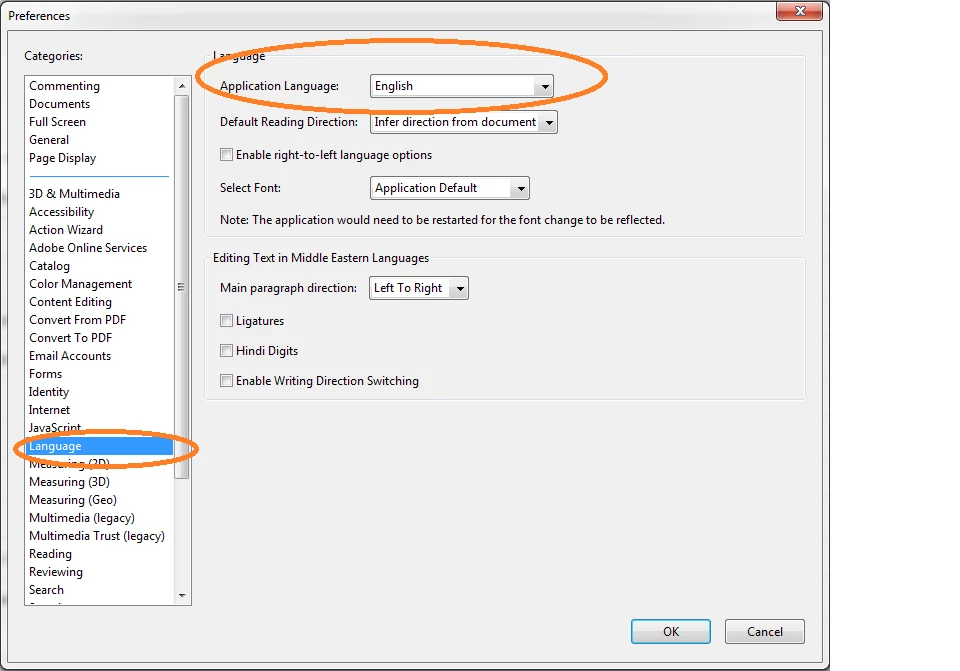
Have you tried toggling this setting under Edit> Preferences:

Regards,

Rave

2 replies

Bani Verma
Legend
April 3, 2016
Sarojini_Nagar
Participating Frequently
March 31, 2016

Hi fastkeysx,

Could you please tell me from where are you trying to install Acrobat XI and also the OS version on your system?

Also please try to download from the mentioned link : Download Pro or Standard versions of Acrobat DC, XI, or X

Let us know if this helps.

Regards

Sarojini

fastkeysxAuthor
Participant
April 3, 2016

Hi,

I downloaded the Acrobat XI installation pkg from the Adobe website (found the download page for older versions - same location as the link you included in your reply.

The fix that partially worked: Fired up "regedit" and looked for all Adobe links within the software branch of the registry.

The UI property was set to "KOR", changed it to "ENU". 

Now when I bring up Acrobat, it does come up with the correct language settings, but the login page still shows up in the Korean locale.  Can you tell me what registry property controls the login page locale?

thanks,

--vla    =:-)

Rave
RaveCorrect answer
Participating Frequently
April 4, 2016

Hi Vicki,

Have you tried toggling this setting under Edit> Preferences:

Regards,

Rave