
Participant
September 30, 2020
Answered

Auto Populating Text Fields

  • September 30, 2020
  • 1 reply
  • 767 views

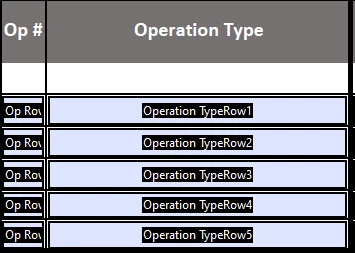
Is there a way to auto populate a text field with consecutive numbers? Looking at the picture, say I start typing in 'Operation TypeRow1', I want the 'Op #' in that same row to auto populate as the number "10". and then when I start typing in Operation TypeRow2, I want the 'Op #' to auto populate to 20.


Side Question:

The Op # for a Rework is always 900. Say I type "Rework" into the 'Operation TypeRow', I want the cooresponding 'Op #' to auto populate as "900" but also keep the formatting mentioned above. Is this possible?
 

This topic has been closed for replies.
Correct answer try67

You can use something like this as the custom calculation script of the first "Op #" field:


var opType = this.getField("Operation TypeRow1").valueAsString;

if (opType=="") event.value = "";

else if (opType=="Rework") event.value = "900";

else event.value = "10";


Adjust the values and field names and you could use the same code for the other fields, too.

1 reply

try67
Community Expert
try67Community ExpertCorrect answer
Community Expert
September 30, 2020

You can use something like this as the custom calculation script of the first "Op #" field:


var opType = this.getField("Operation TypeRow1").valueAsString;

if (opType=="") event.value = "";

else if (opType=="Rework") event.value = "900";

else event.value = "10";


Adjust the values and field names and you could use the same code for the other fields, too.

Tyler5C89Author
Participant
October 1, 2020

This worked great! Thank you!