


Participant
May 28, 2018
Answered

Auto tab to the next text field (help)

  • May 28, 2018
  • 3 replies
  • 2552 views

Hello guys,

I´ve had some very basic programming a long time ago, but javascript wasn't one of them...

I have this (a form I created):
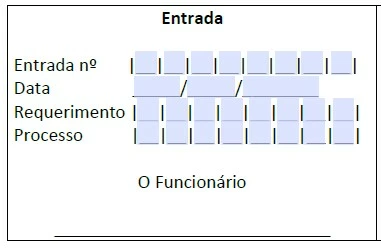
and I need to know how to make it so that once you fill in a number, it goes to the next text field on it's own.

Those are all 1 character limit text fields, let's assume they're called T1, T2, T3 (...) and so on. How do I make it so that once the first text field (T1) reaches that 1 character limit, it automatically moves me to the second (T2)? I saw some answers on the forum wich seem to explain how to do this, but I coudn't figure out wich parts of the code to change/adapt, nothing I tried worked

This topic has been closed for replies.
Correct answer MatLac10492407

This is the code you would put in the custom keystroke event of "Text1" so it tabs to "Text2" as soon as a non-empty (erase) String is keyed in.

if (event.willCommit == false){

    if (event.value != ""){

       if (event.change != "") this.getField("Text2").setFocus()

    }

    else this.getField("Text2").setFocus()

}

It will handle punching a character from nothing, changing a character that was previously there but will not tab when erasing a character

If you do not wish to manually copy and modify this script across all your fields, place this script in a document-level script and call it from the field, passing the name of the field as an argument.

3 replies

Inspiring
May 28, 2018

What code?

The examples I have seen only require the changing the name of next field to jump to. This assumes you have set the maximum number of characters for the field and added the appropriate document level JavaScript code.

Have you checked the JavaScript console for errors?

Bernd Alheit
Community Expert
Community Expert
May 28, 2018

You can use the comb. option of the text fields.

heysnow99Author
Participant
May 28, 2018

That option is greyed out for me.

Bernd Alheit
Community Expert
Community Expert
May 28, 2018

You must disable the other entries.

MatLac10492407Correct answer
Inspiring
May 28, 2018

This is the code you would put in the custom keystroke event of "Text1" so it tabs to "Text2" as soon as a non-empty (erase) String is keyed in.

if (event.willCommit == false){

    if (event.value != ""){

       if (event.change != "") this.getField("Text2").setFocus()

    }

    else this.getField("Text2").setFocus()

}

It will handle punching a character from nothing, changing a character that was previously there but will not tab when erasing a character

If you do not wish to manually copy and modify this script across all your fields, place this script in a document-level script and call it from the field, passing the name of the field as an argument.

heysnow99Author
Participant
May 28, 2018

Thank you!

The one I found before was this:

-----\\-----\\-----

// Document-level function

function tab_next(next_field_name) {

    // Move to next field if Enter key is pressed
    // or the user has clicked outside of the field
    // or if the number of character is the character limit
    if (event.willCommit || AFMergeChange(event).length === event.target.charLimit) {
        getField(next_field_name).setFocus();
    }
}

// Autotab to the "text2" field

tab_next("text2");

-----\\-----\\-----

I changed "text2" to "n2", wich was my case, and it wasn't working, somehow it started to work after I tried your method...

Btw, since it's a document-level function, what part do I need to add to the other text fields? I'm assuming it's just: tab_next("NameOfNextHere");  right?

Sorry if I'm being dumb rn, I just never used this before.

Also, what do I need to do to turn your function into a document-level function? Can I make these accept numbers only?

Inspiring
May 29, 2018

First, you turn the code into a function and name it goToNext() like this

function gotToNext(){

//place code here

}

You move the code at document level tool / javascript / document-level

and you call goToNext() from the keystroke event

goToNext()

instead of explicitly naming the next field, you pass it as an argument

goToNext("Text2")

function gotToNext(x){

//code

this.getField(x).setFocus()    //update this part

//code

}

And to overkill it, use an increment to automatically apdate the value of next field (providing you named your fields just right)

Given:   "Text.1", "Text.2", "Text.3", etc

//return name of target field

//Update the value of suffix (+1)

//Join the string

//Pass the new string as an argument