
Participant
May 31, 2016
Question

Barcode turns grey

  • May 31, 2016
  • 1 reply
  • 553 views

Similar questions have been asked, but they are all older so I guess it's ok to ask again.

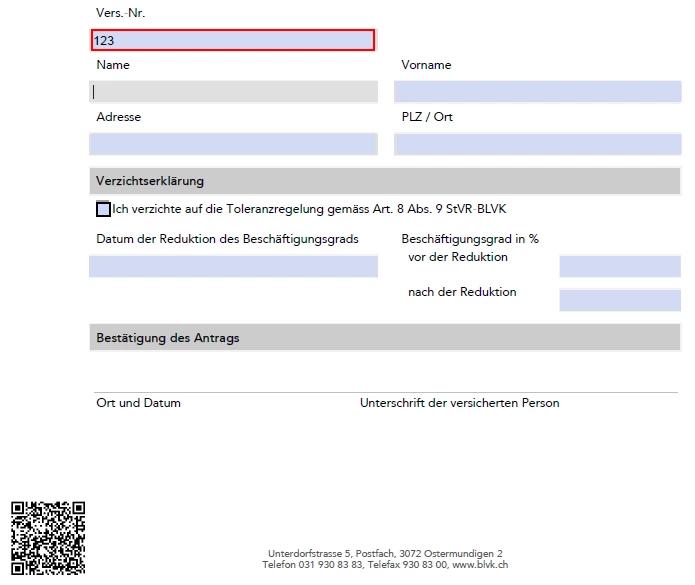
I've created a form with Adobe Acrobat Pro DC with a Barcode which only appears if a certain field has been filled out.

Also, the barcodes value is dependen on that field.

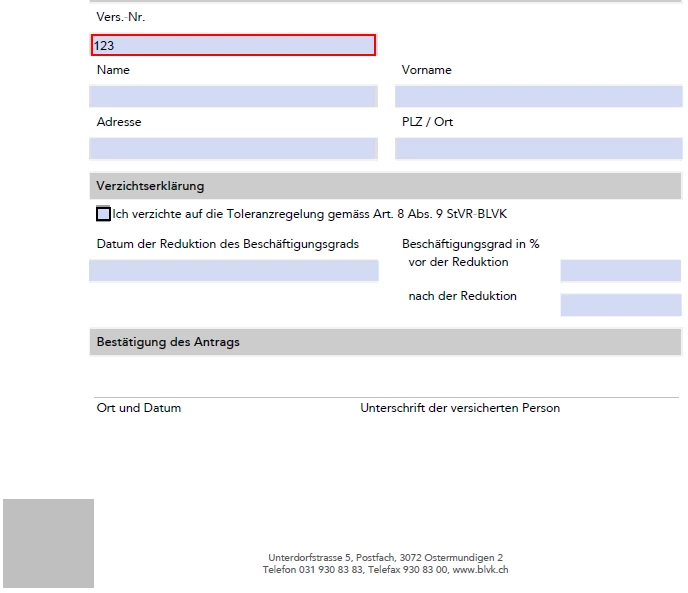
This all works fine with Adobe Acrobat Pro DC. However, if I open the document in AdobeAcrobat Reader DC, the place where the Barcode is supposed to show up turns grey. All the other JavaScript on the document works fine.

Any idea how to solve this?

Thank you in advance

What it's supposed to look like:
What it looks like:
This topic has been closed for replies.

1 reply

try67
Community Expert
Community Expert
May 31, 2016

The answer is the same as before... To have a dynamic 2D barcode work in Reader you must apply very special rights to the file first, using a LiveCycle server application.

kiradeAuthor
Participant
May 31, 2016

Can you be any more specific than "a LiveCycle server application"?

Do you mean this: Adobe® LiveCycle® Designer ES4 ?

It seems there's no trial version of this available. How do I know it really works without spending 300$ ?

try67
Community Expert
Community Expert
May 31, 2016

No, it's not that application. Adobe keeps changing the names, but it used to be called Adobe LiveCycle Reader Extensions, I believe. You will need to contact Adobe to get a quote, but I can assure you it will be much more than that. Probably thousands of dollars...