
Participant
March 30, 2016
Question

Batch processing permissions error

  • March 30, 2016
  • 1 reply
  • 422 views

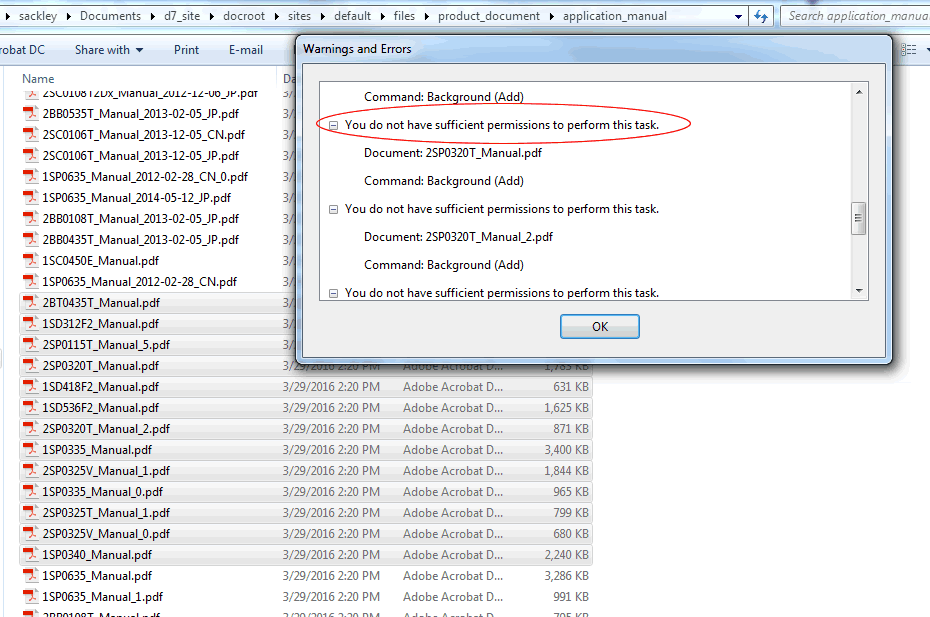
Using the full version of  Acrobat Pro DC, I am trying to add white backgrounds to several documents using the "Apply to multiple files" batch processing. These files are password protected. I have the password and am able to add the files to the processing queue. However, when I run the update, I get the error: "You do not have sufficient permissions to perform this task" (see screenshot). I am able to make the changes to the files individually without a problem. Does anyone know what type of permissions are needed to make this change using batch process?
This topic has been closed for replies.

1 reply

Participating Frequently
March 30, 2016

Hi mingus123 ,

Please provide the exact dot version of the software & OS installed at your system .Also check whether is there any update available for the software after going through "help > check for updates "

Would like to know are these files are saved over server drive , if yes then first save them to local drive & then check for the same .

Also would request you please share your work flow as well.

You may also check with different user account with admin rights to replicate the issue.

Regards,

Yatharth 

mingus123Author
Participant
March 31, 2016

This is the  version of Acrobat I'm using. It is up-to-date. I'm running Windows 7. The files are on my local drive. My workflow is that I am...

1. Opening a PDF

2. Going to edit

3. Entering the password

4. Going to "add background"

5. Selecting "apply to multiple files"

6. Entering the password for each file in the queue

7. Clicking "ok"

That's when I get the above error.

Bernd Alheit
Community Expert
Community Expert
March 31, 2016

Remove the security before you add the background.