


WSheehey
Known Participant
October 21, 2016
Answered

Calculate - Simplified field notation - problem with sales tax calc

  • October 21, 2016
  • 4 replies
  • 1067 views

Hello,

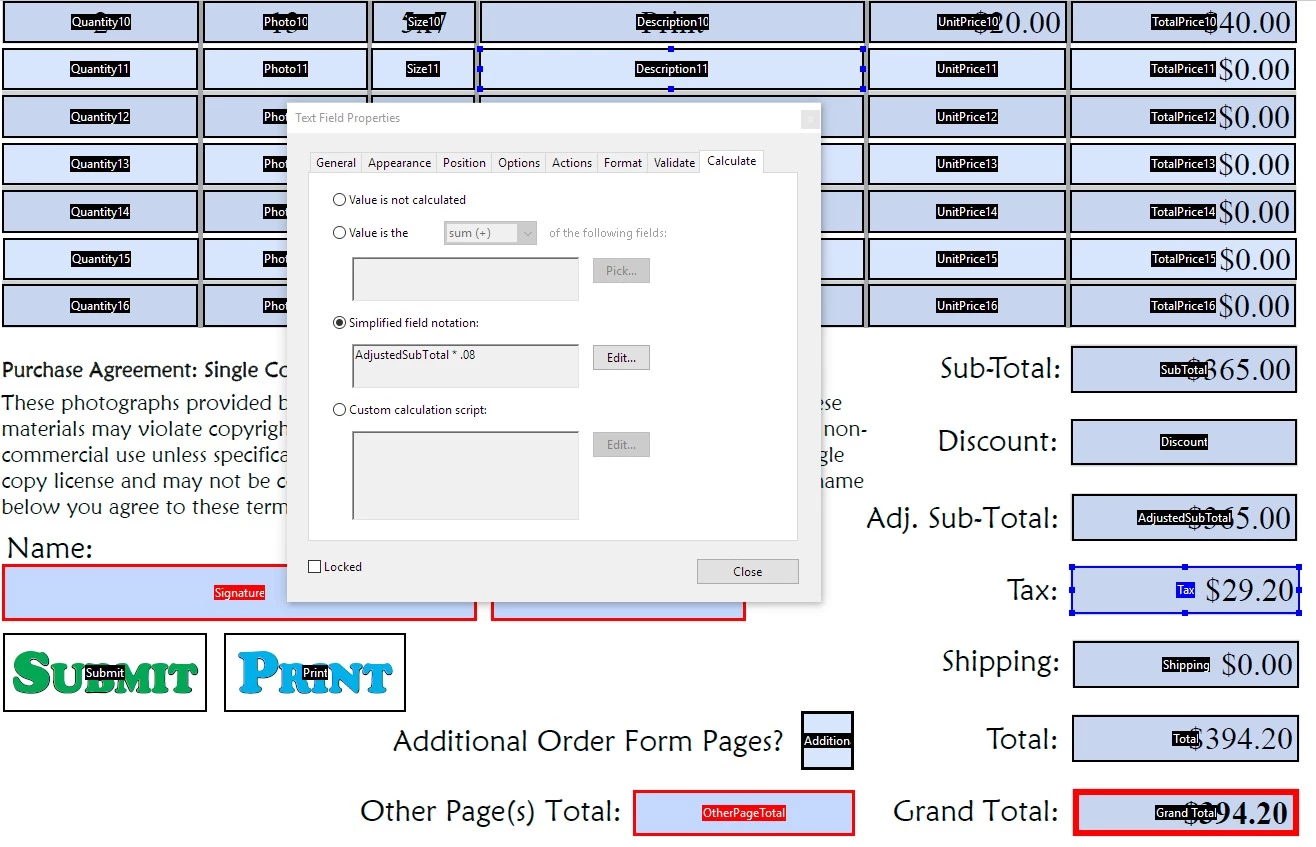
I have an order form with a field for tax. Under Simplified field notation: I entered AdjustedSubTotal*.08.

When I fill in the form everything works except this field. A number will be displayed, but not the correct calculation. If I go into the properties of the field, get to the Calculate tab, click Edit on the Simplified field notation: portion and simply click "OK" without changing anything, the field calculates the amount correctly.

Any idea why that would be?
This topic has been closed for replies.
Correct answer George_Johnson

First go into form editing mode: Tools > Prepare Form

and then in the right-hand panel select: More > Set Field Calculation Order

and arrange the list of calculated fields in the order that makes sense for your form.

4 replies

Inspiring
October 21, 2016

It's because the field calculation order is not correct. Exactly how you set it depends on what version of Acrobat you're using.

WSheehey
WSheeheyAuthor
Known Participant
October 22, 2016

Thanks, George. Could you elaborate on how to fix it. I'm using 2015 Release (Continuous) Version 2015.020.20039. I believe it's the most current version.

George_JohnsonCorrect answer
Inspiring
October 22, 2016

First go into form editing mode: Tools > Prepare Form

and then in the right-hand panel select: More > Set Field Calculation Order

and arrange the list of calculated fields in the order that makes sense for your form.