


MM6672
Participating Frequently
April 7, 2018
Resuelto

calculating radio buttons

  • April 7, 2018
  • 20 respuestas
  • 6270 visualizaciones

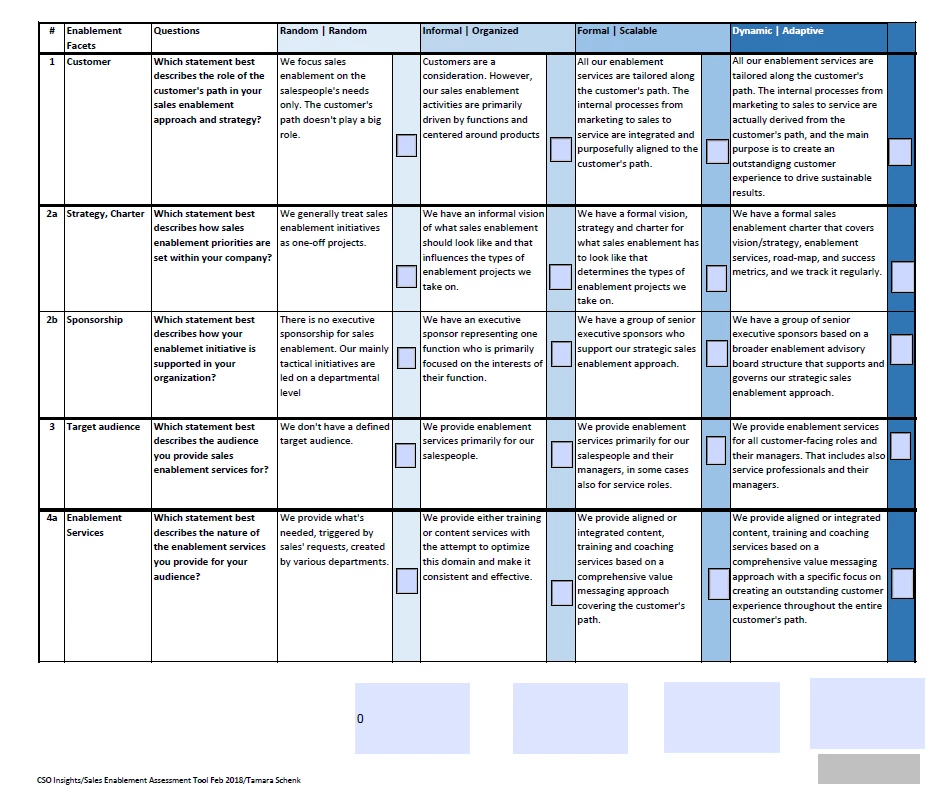
Help with radio buttons. I need to calculate a specific button in a given group/row.

I have a form with radio buttons. I've roughly set the radio buttons in for now. I need to have each column total Random, Informal, Formal and Dynamic. So only one radio button selected from each horizontal row 1, 2a, 2b etc.

I'm guessing it has something to do with scripting which I'm not very familiar with.
Este tema ha sido cerrado para respuestas.
Mejor respuesta de try67

Let's say there are five groups and you want to count in how many of them the value "1" is selected.

Use this code as the custom calculation script of the total field:

var total = 0;

for (var i=1; i<=5; i++) {

    var f = this.getField("Group "+i);

    if (f.valueAsString=="1") total++;

}

event.value = total;

20 respuestas

Inspiring
April 7, 2018

You should have the radio button in each row in the same exclusionary group and each button has a unique export value. This will result in at most only one item selected in a row. Note you will not be able to unselect a button in a row by clicking on it, you will need a some additional scripting to do that.

Acrobat PDF count dropdown choices

has some possible coding to count the selected radio buttons selected in each column.

try67
Community Expert
Community Expert
April 7, 2018

What are the names of the radio-button groups, and are the export values the same in each group?

MM6672
MM6672Autor
Participating Frequently
April 8, 2018

The radio button  are Group 1 2, 3 etc. and value of just 1 per checkbox or radio button selection. Plus Choice 1, 2, 3, 4. I'm very new to scripting so is it possible to write one out and I can apply one to my document?

try67
Community Expert
try67Community ExpertRespuesta
Community Expert
April 8, 2018

Let's say there are five groups and you want to count in how many of them the value "1" is selected.

Use this code as the custom calculation script of the total field:

var total = 0;

for (var i=1; i<=5; i++) {

    var f = this.getField("Group "+i);

    if (f.valueAsString=="1") total++;

}

event.value = total;
