
Known Participant
February 5, 2020
Question

Calculations based on .includes

  • February 5, 2020
  • 1 reply
  • 632 views

Hi all,


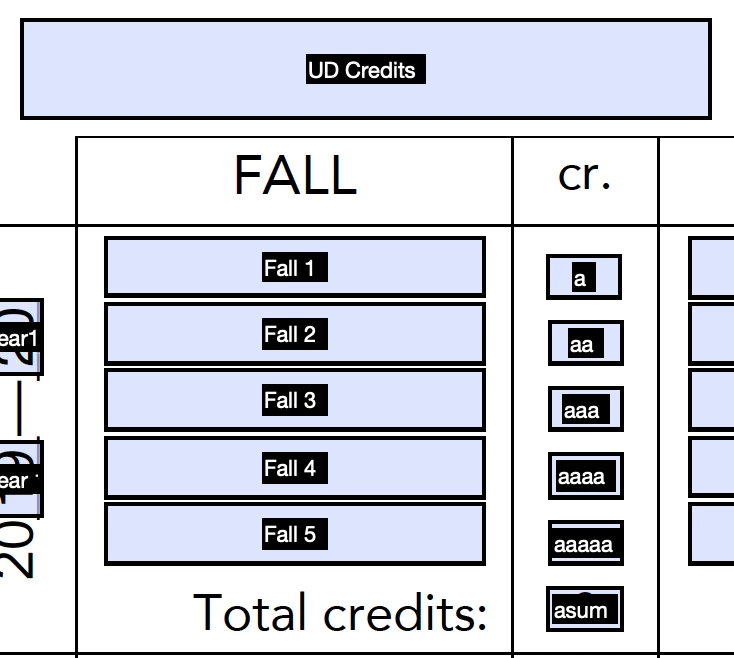
Trying to figure out the custom calculation script to be able to add multiple values of different form fields if a form field includes a value above 300. For context, I am trying to sum the number of upper division credits, (courses at 300 level or above,) for a form that I use to meet with students. In the attached file, I would love for "UD Credits" to add the value of "a" if "Fall 1" includes in a string a value above 300, such as MATH 321. I would then need to add the respective values of "aa," "aaa," "aaaa" and so on based on their respective left form fields. 


Sorry to ask this question! I'm very, very new at javascript and I've tried to experiment with the script by using boolean logic, .includes, etc. but I'm just not able to make anything work!


This topic has been closed for replies.

1 reply

Thom Parker
Community Expert
Community Expert
February 5, 2020

There are several parts to creating such a script.

1) the script needs to draw a relationship between the "Fall" and the "a" fields. This is usually done with field naming, although you could also create an array of fields as well. 


2) The script need to be able to identify the number part of the data. Use RegExp pattern matching for this.

Here's an article:https://acrobatusers.com/tutorials/text-matching-regular-expressions/


3) The method: Loop over the list of "Fall" names,  if pattern is found, and is > 300, the add associated value;


Thom Parker - Software Developer at PDFScriptingUse the Acrobat JavaScript Reference early and often
Known Participant
February 5, 2020

Thank you so much for the quick response! Sorry to ask, but do you have an example of the script you are describing? I'm reading over the RegExp article you've listed and I'm not sure how I might link it to the >300 script to write... Thanks again! I really appreciate it!

Thom Parker
Community Expert
Community Expert
February 5, 2020

this regular expression will identify 3 numbers by themselves.


var rg3Digit = /\b(\d{3})\b/;


The \b part means word boundary. So this would not form for something like "Something 345a". For that you would need to modify the RegExp.

Notice that the digits are grouped so they can be extracted for use with the comparison. 


You'll need to read up on JavaScript Regular Expressions to use it in a script. 


Thom Parker - Software Developer at PDFScriptingUse the Acrobat JavaScript Reference early and often