


stephanier97973891
Participant
May 2, 2017
Answered

Can I connect a Drop Down Field w/ a Text Field?

  • May 2, 2017
  • 1 reply
  • 595 views

I want to set up the drop down field to where when the item is chosen the price for that item shows up in a different text field.

So if they pick Tin from the "Material Options" drop down field the price $.04 will show up in the "Price" text field. 

What do I need to do to set that up?  I was thinking JavaScript but do not know how to set it up.  Can someone please help me w/ the right code?

Also, after the price shows up in the Price text field, can that field still be calculated w/ a different text field?

This topic has been closed for replies.
Correct answer Joel Geraci

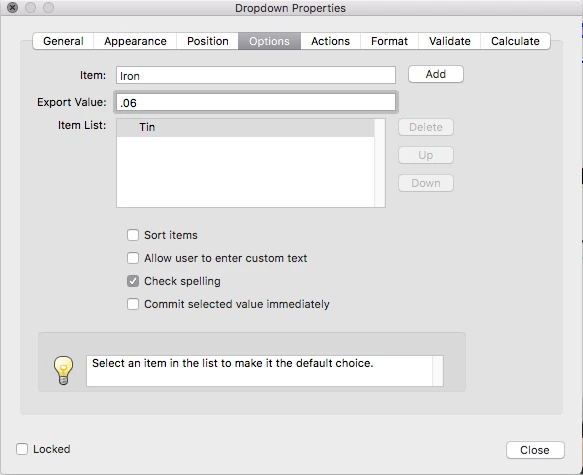
Dropdowns have an item name and an export value. The item name is what appears in the list. The export value is what gets used in calculations. Just add your item names and set the value you want to appear in the Price field for that item to be the export value. 

The calculation for your total field becomes...

event.value = this.getField("Material Options").value * this.getField("Weight").value

Your "Price" field is basically just for show.

1 reply

Joel Geraci
Community Expert
Community Expert
May 2, 2017

Add the following code to the price field calculation script...

event.value = this.getField("Material Options").value;

I'm not sure what you are asking in the last sentence. "Price" can, of course, be used as the input to another calculation if that's what you meant. But it reads as though you want "Price" to be populated but also be calculated after a price has been selected. you can only have one calculation per field so if you wanted the value of "Price" to be calculated based on "Material Options" and something else, you'd need to put that in the calculation script as well... for example if "Price" is "Material Options" multiplied by the "Quantity", your calculation for "Price" would be...

event.value = this.getField("Material Options").value * this.getField("Quantity").value

stephanier97973891
Participant
May 2, 2017

I tried to place the first script event.value = this.getField("Material

Options").value; but it only works if the Formats are the same in both

fields. The drop down field has words like, Tin, Short Iron, Long Iron.

I’m wanting the “Price” field to be a number. Can they still connect? Or

do I have to come up with a different solution to connect them?

For my last sentence: this is how I have it set up on my PDF. The drop

down list is the “Material Options”. When the person picks the material

(Tin, Short Iron, Long Iron, etc.), I want the particular price for that

item to show up in the “Price” field. Then they’ll enter the weight and

I’ll have ‘Price x Weight’ in the “Total” field.

Material Options

Price

Weight

Total

On another note, I found a different post about connecting two different

drop down fields. I tried the script and it worked how I wanted it to but,

I couldn’t do my multiplication equation in the “Total” field w/ a drop

down list #. Do you have any suggestions?

Thank you!

Stephanie Rivera

Engineering Assistant

Joel Geraci
Community Expert
Joel GeraciCommunity ExpertCorrect answer
Community Expert
May 2, 2017

Dropdowns have an item name and an export value. The item name is what appears in the list. The export value is what gets used in calculations. Just add your item names and set the value you want to appear in the Price field for that item to be the export value. 

The calculation for your total field becomes...

event.value = this.getField("Material Options").value * this.getField("Weight").value

Your "Price" field is basically just for show.