
scottstabb
Known Participant
January 14, 2016
Question

cannot use text comment

  • January 14, 2016
  • 2 replies
  • 1269 views

Acrobat XI Pro "add text comment" not working

Does anyone have an answer for this yet?

chatting with support for hours.

When I click on a document to add a text comment,

1. Acrobat creates a small square (uneditable)

2. Acrobat adds a comment to the comments list
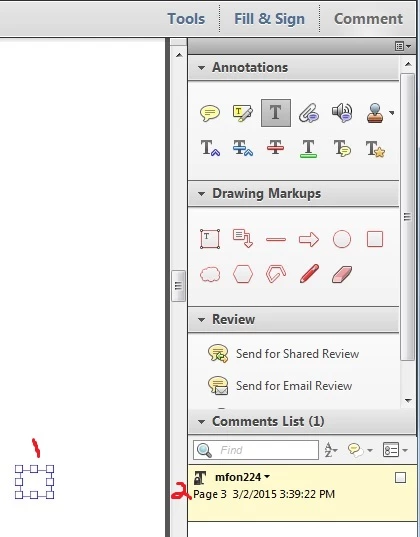
This topic has been closed for replies.

2 replies

abhissha
Participating Frequently
January 16, 2016

Hi Scott,

Please double click inside the small square and type something in it.

Thanks,

Abhishek

scottstabb
Known Participant
January 18, 2016

The dot version is .0.14

Double clicking on the square does nothing.

What I had to do was to find a document where comments were made successfully and right click on it and clicked on use as default and un-check the Lock box. 

abhissha
Participating Frequently
January 18, 2016

Hi Scott,

So unchecking the Lock option under Properties worked for your all the documents?

Thanks,

Abhishek

Meenakshi_Negi
Legend
January 15, 2016

Hi scottstabb,

Please provide the dot version of Acrobat XI and OS installed on your system.

Regards,

Meenakshi