


Participant
October 26, 2018
Answered

cascade droplist

  • October 26, 2018
  • 1 reply
  • 800 views

I'm likely out of my element here... but here goes!

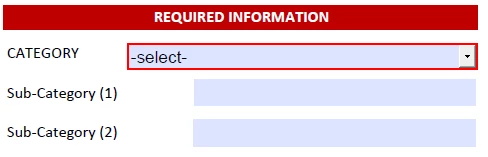
I created a file in excel and made a form with it in Adobe Acrobat XI Standard (in Windows).

I have 3 dropdown lists that I want to be dependent - or cascade?  For example - if the category "BOILER" is chosen, then the Sub-Category only allows a list containing "Alpa, Beta, or Charlie" as it's 3 choices... and if Beta is chosen as the Sub-Category(1), then the Sub-Category(2) only has a list containing 1033, 1003, 10003

Is that realistic or too complicated for a beginner like me?
This topic has been closed for replies.

1 reply

try67
Community Expert
Community Expert
October 26, 2018

It's certainly doable. Whether or not you'll be able to write the code required to achieve it, is up to you...

Basically you would need to use the Validate or Keystroke event of the first two fields to set the values of the ones after them in the "cascade", based on a data model of some kind.

If you're interested, I've developed a (paid-for) tool that allows you you to set up such "cascading" drop-down fields very easily (based on a spreadsheet with all the data in it), without having to write any code. You can find it here: Custom-made Adobe Scripts: Acrobat -- Create Cascading Dropdowns

gev0666Author
Participant
October 26, 2018

It's a new job... not even sure this will be used -- I'm just trying to impress...

try67
Community Expert
try67Community ExpertCorrect answer
Community Expert
October 26, 2018
