
Centering elements in isotope
Hello everyone and I hope you're doing well. I am using Isotope and below you can see the JS that I've wrote. The thing is that I find it impossible to center -li- elements which they are the Isotope elements. By centering I mean the image below. I've managed to center the whole Isotope to the screen but I need the elements to be centered too and not just float to the left side.
Let's start with my script code:
<script>
$(document).ready(function(e) {
$(".ullist li").addClass('element-item'); });
</script>
<script>
$(document).ready(function(e) {
// external js: isotope.pkgd.js
// init Isotope
var $grid = $('.grid').isotope({
itemSelector: '.element-item',
//layoutMode: 'fitRows',});
//$('.grid').isotope({ layoutMode : 'fitRows' });
// filter functions
var filterFns = {
// show if number is greater than 50
numberGreaterThan50: function() {
var number = $(this).find('.number').text();
return parseInt( number, 10 ) > 50;},
// show if name ends with -ium
ium: function() {
var name = $(this).find('.name').text();
return name.match( /ium$/ );}
};
// bind filter button click
$('#filters').on( 'click', 'a', function() {
var filterValue = $( this ).attr('data-filter');
// use filterFn if matches value
filterValue = filterFns[ filterValue ] || filterValue;
$grid.isotope({ filter: filterValue });
});
// change is-checked class on buttons
$('.secmenu ul a').each( function( i, buttonGroup ) {
var $buttonGroup = $( buttonGroup );
$buttonGroup.on( 'click', 'a', function() {
$buttonGroup.find('.is-checked').removeClass('is-checked');
$( this ).addClass('is-checked');
});
});});
</script>
<script>
$(function(){var $container = $('.grid'),
$body = $('body'),
colW = 20,
columns = null;
$container.isotope({
// disable window resizing
resizable: true,
masonry: {
columnWidth: colW,
isFitWidth: true
}
});
$(window).smartresize(function(){
// check if columns has changed
var currentColumns = Math.floor( ( $body.width() -10 ) / colW );
if ( currentColumns !== columns ) {
// set new column count
columns = currentColumns;
// apply width to container manually, then trigger relayout
$container.width( columns * colW )
.isotope('reLayout');
}}).smartresize(); // trigger resize to set container width
});
</script>
Basic HTML structure:
  <ul class="ullist grid">
<li> ... </li>
<li> ... </li>
<li> ... </li>
<li> ... </li>
   </ul>
Isotope works pretty good with no issues (as for now). This is my current layout:
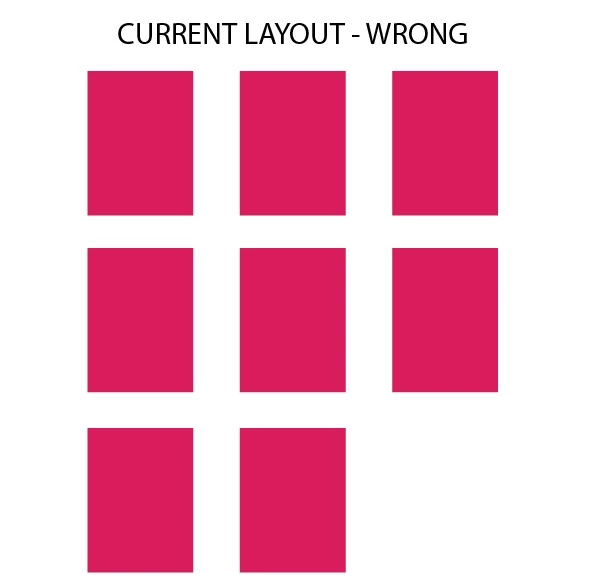
And this is the desirable layout.
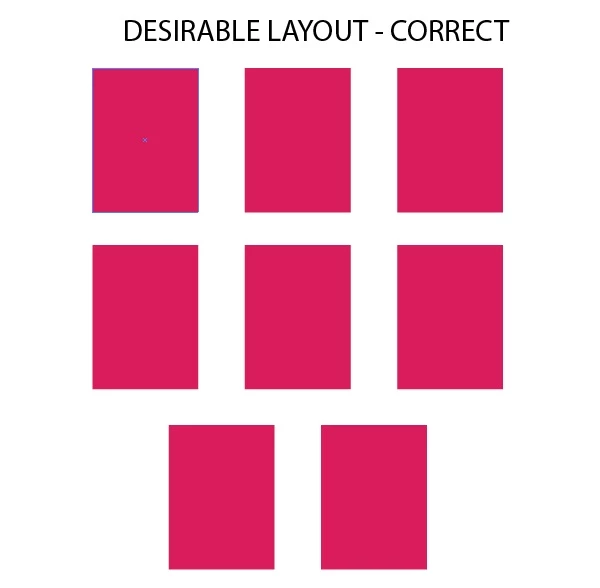
I even checked here and tried to use David DeSandro's repository but with no success. So please guys can you help me here to achieve the layout above? Thank you all in advance.


 AdChoices