WaseemXam84
Participant
March 20, 2018
Answered

Checkbox value to be displayed with another value in the text feld

  • March 20, 2018
  • 1 reply
  • 839 views

I have a statement which has 4 options and user can only select option from them, For example

Q: Which fruit is called the king of all from these?

a. Apple

b. Grapes

c. Mango

d . Peanut

My Answer: _______

When the user will select any one checkbox from above,  i want the text field to show that option alphabet in the below text field.

Like if he select 'Apple' i want to show the alphabet 'a' at bottom only.

Currently, i have given these 4 options checkbox a number value which i am using to calculate marks so as far my knowledge this can only be done by giving the above checkbox value a substitute in the below text field using javascript.

Can somebody assist me in this since am not an expert in javascript?

Many thanks.
This topic has been closed for replies.
Correct answer WaseemXam84

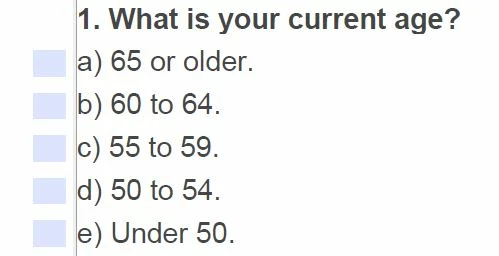
To clear you more, here's the question 1,

After the user will select any one option from the above  i will basically be needing 2 things from it.

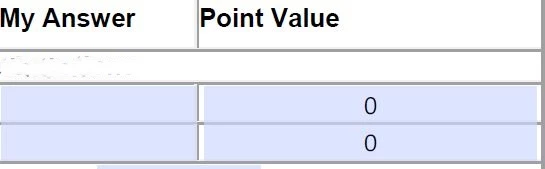
1. The option alphabet that he select will be showing under my Answer column show below.

2. The 'point value' will give him the marks based on option he select i,e(like for option a=1, option b=2, option c=3, option d=4, option e=5)

So i have given all the 4 checbox name as CHECK BOX 1 and there values 1,2,3,4 and 5. Now i only need the alphabet part to shown in the first column while the Point value is working fine since its taking the value from the option that he selects.


So i managed to get this done with the help of this code:

Below code mentioned in the My Answer Text Field and name this field as Text Field 3

event.value = this.getField("Check Box 1").value;

if (event.value == "Off") event.value = "";  //This will catch up the option alphabet value based on the option that i selects.

Then Below code pasted in the text field of Point Value which will show the number in corresponds to the option that is selected.

event.value = this.getField("Text Field 3").value;

// if value is "Off" then clear the field

if (event.value == "a") event.value = "1";

if (event.value == "b") event.value = "2";

if (event.value == "c") event.value = "3";

if (event.value == "d") event.value = "4";

if (event.value == "e") event.value = "5";

1 reply

Thom Parker
Community Expert
Community Expert
March 20, 2018

There are a few ways to do this, but the easy one is to use a case statement in the Calculation script for the Answer field.

I'm assuming you really mean these are radio buttons, where only one can be set at a time.

For example:

var cValue = this.getField("FruitQuestion").value;

switch(cValue)

{

   case 1:

      event.value = "a";

      break;

   case 2:

      event.value = "g";

      break;

}

fill it out for all the values.

BTW: Durian is the King of Fruits, look it up.

Thom Parker - Software Developer at PDFScriptingUse the Acrobat JavaScript Reference early and often
WaseemXam84
Participant
March 21, 2018

I am doing this by checkbox actually and if you use the same name for all 4 checkbox and only change there value then you only can select 1 option from all 4 options..

WaseemXam84
Participant
March 21, 2018

To clear you more, here's the question 1,

After the user will select any one option from the above  i will basically be needing 2 things from it.

1. The option alphabet that he select will be showing under my Answer column show below.

2. The 'point value' will give him the marks based on option he select i,e(like for option a=1, option b=2, option c=3, option d=4, option e=5)

So i have given all the 4 checbox name as CHECK BOX 1 and there values 1,2,3,4 and 5. Now i only need the alphabet part to shown in the first column while the Point value is working fine since its taking the value from the option that he selects.