
Inspiring
November 24, 2022
Answered

Color filling in dropdown items

  • November 24, 2022
  • 2 replies
  • 707 views

Hi all respectable members, I want to add RGB Colors in Dropdown items, I am using code in custom calculation, here is my code:

event.value=this.getField("Dp3").value;

if (event.value=="Day (08:00-20:00)")

event.target.fillColor = ["RGB",234,241,221];

else if (event.value=="WN (20:00-08:00)")

event.target.fillColor = ["RGB",217,149,148];

else if (event.value=="Sleeping O/N standby (20:00-08:00)")

event.target.fillColor = ["RGB",184,204,228];

else

event.target.fillColor = color.transparent;


but failed is there any way to change colors.
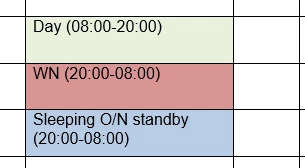


Please I have need your help

This topic has been closed for replies.
Correct answer JR Boulay

You don't need to divide color values, JavaScript can do it for you:


event.target.fillColor = ["RGB", 184/255, 204/255, 228/255];

2 replies

JR Boulay
Community Expert
JR BoulayCommunity ExpertCorrect answer
Community Expert
November 24, 2022

You don't need to divide color values, JavaScript can do it for you:


event.target.fillColor = ["RGB", 184/255, 204/255, 228/255];

Acrobate du PDF, InDesigner et Photoshopographe
Inspiring
November 26, 2022

Yes I did same. Thank You so much Try67 and JR Boulay

try67
Community Expert
Community Expert
November 24, 2022

RGB values in Acrobat JS should be between 0 and 1, so divide your values by 255 to get the correct result.

Inspiring
November 24, 2022

Thank You So much