



Combine Document Preserving Document Names
I am looking to combine multiple PDFs using the "Interapplication Communication API Reference"
The below snippet will combine the documents and preserve the layers it won't give the same results as creating a binder using the UI combine documents button
The difference being 1) The combine button creates layers for each PDF document and with the document layers created as sub layers whereas the snippet just created the doc layers without the parent layers as per document name. 2) The button automatically creates bookmarks for each document, the snippet doesn't.
Any ideas how to at least get point 1 working. It's for windows and either powershell or vbs would be easiest.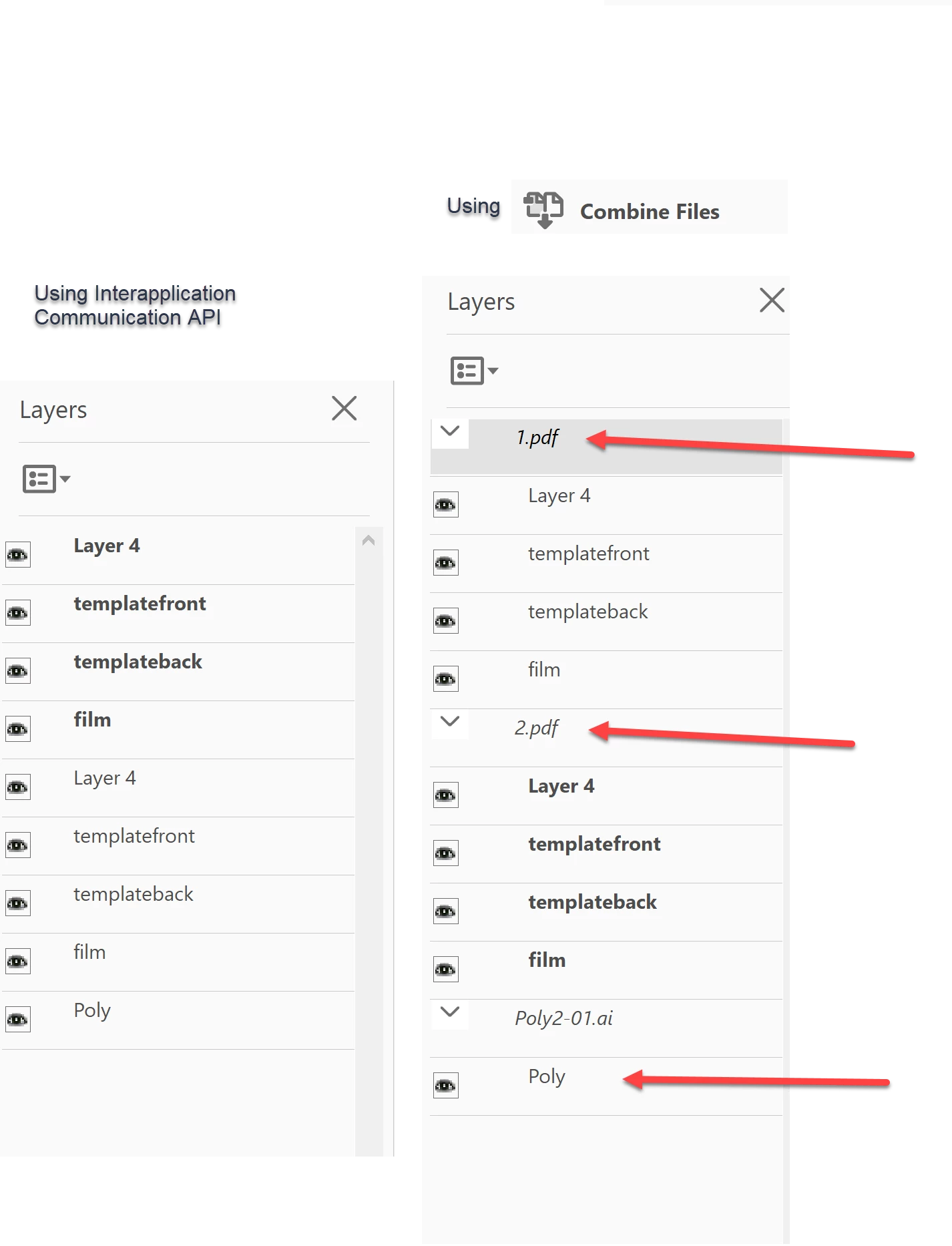
Edit: I see the bottom red bottom red arrow is in the wrong place so please use your imagination to put it in the correct place 🙂
call main
sub main
Dim app
Set app = CreateObject("AcroExch.App")
Set destDoc = CreateObject("AcroExch.PDDoc")
Set doc1 = CreateObject("AcroExch.PDDoc")
Set doc2 = CreateObject("AcroExch.PDDoc")
Set doc3 = CreateObject("AcroExch.PDDoc")
src1Path = "C:\Users\Trevor\Creative Cloud Files\PDF\1.pdf"
src2Path = "C:\Users\Trevor\Creative Cloud Files\PDF\2.pdf"
src3Path = "C:\Users\Trevor\Creative Cloud Files\PDF\Poly2-01.ai"
destPath ="C:\Users\Trevor\Creative Cloud Files\PDF\dest.pdf"
destDoc.Create
doc1.open src1Path
doc2.open src2Path
doc3.open src3Path
destDoc.InsertPages destDoc.GetNumPages() - 1, doc1, 0, 1, 1
destDoc.InsertPages destDoc.GetNumPages() - 1, doc2, 0, 1, 1
destDoc.InsertPages destDoc.GetNumPages() - 1, doc3, 0, 1, 1
destDoc.Save &H1, destPath
' doc1.Close()
' doc2.Close()
' doc3.Close()
' destDoc.close;
app.Exit
end sub

 AdChoices