
Participating Frequently
May 26, 2020
Answered

Combining multiple field entries into one field OR not

  • May 26, 2020
  • 2 replies
  • 1804 views

I would like to auto-populate a field in Adobe using the first & last names of the people completing the form as per the following:

DETAILS ENTERED BY CLIENTS ON PAGE ONE
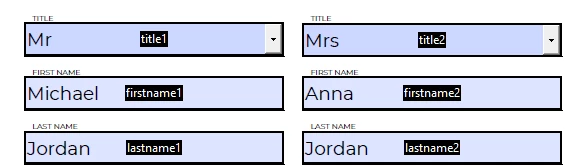


FIELD I NEED TO AUTO POPULATE

 

I am using the following custom calculation script to auto populate "authorisation_1", which works fine when the "firstname2" and "lastname2" fields have been populated:

event.value = getField("firstname1").valueAsString + " " + getField("lastname1").valueAsString + " & " + getField("firstname2").valueAsString + " " + getField("lastname2").valueAsString;


However, my question is, how do i ensure the "&" does not appear in "authorisation_1" field IF nothing has been entered into the "firstname2" and "lastname2" fields?


NEED TO AVOID THIS

 

Thanks in advance.

This topic has been closed for replies.
Correct answer ls_rbls

HI,


You may declare variables instead of using the long typing method to make your script more organized and easier to read as an equation if you want (but this just my preference).


Then  add an IF/ELSE condition to your custom calculatiopn script. It could be something like this, for example:


var name1 = getField("firstname1").valueAsString;
var last1 = getField("lastname1").valueAsString;
var name2 = getField("firstname2").valueAsString; 
var last2 = getField("lastname2").valueAsString;

if  (  ( (name1 !="") && (last1 !="") ) && (  (name2 !="") && (last2 !="") )  ) event.value = name1+" "+last1+ " & " + name2+ " "+last2;
else  event.value = name1+" "+last1;


2 replies

Participating Frequently
June 30, 2022

Hi,

Look at line 2 and remove:


+ "&"


It should work fine.


Good Luck


ls_rbls
Community Expert
ls_rblsCommunity ExpertCorrect answer
Community Expert
May 26, 2020

HI,


You may declare variables instead of using the long typing method to make your script more organized and easier to read as an equation if you want (but this just my preference).


Then  add an IF/ELSE condition to your custom calculatiopn script. It could be something like this, for example:


var name1 = getField("firstname1").valueAsString;
var last1 = getField("lastname1").valueAsString;
var name2 = getField("firstname2").valueAsString; 
var last2 = getField("lastname2").valueAsString;

if  (  ( (name1 !="") && (last1 !="") ) && (  (name2 !="") && (last2 !="") )  ) event.value = name1+" "+last1+ " & " + name2+ " "+last2;
else  event.value = name1+" "+last1;


ray_greyAuthor
Participating Frequently
May 26, 2020

Hi ls_rbls, 


This suggestion worked perfectly... thank you.

ls_rbls
Community Expert
Community Expert
May 27, 2020

You're welcome.