
Participating Frequently
January 17, 2016
Answered

Comments and highlights lost following computer formatting

  • January 17, 2016
  • 1 reply
  • 950 views

Hi there

So, I formatted my computer and re-installed the operating system and all of my comments and highlights that I spend ages adding to pdf documents now appear to be lost. This is highly unfortunate. In hindsight maybe it was naive to think that all such additions where connected to the individual pdf and would thus be preserved in the process. Anyway, I would like to know how I avoid the same mistake in the future. I.e.: where are all these comments and highlights stored and can I choose that storage location myself (i.e. moving it to within my dropbox to save all changes made).

Cheers

Jakob
This topic has been closed for replies.
Correct answer try67

You can't edit a file that's on Dropbox directly, though (unless it's on your local Dropbox folder). When you open it it downloads to a temporary file, which you probably need to manually upload later on for it to update the version that's on the server.

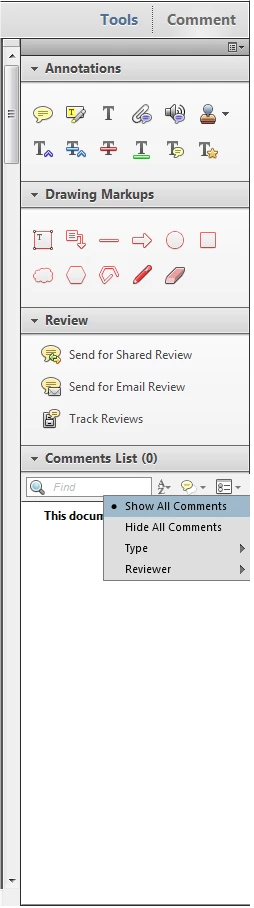
To check if the file has any comments open it and then go to the Comment panel on the right and check the number Comments List.

Make sure that the filter is set to Show All Comments:

If it is and it still shows the number of comments as zero, then they're just not there.

1 reply

try67
Community Expert
Community Expert
January 17, 2016

They are stored inside the file. But if you formatted your computer that means you deleted all of the files on it... Did you not make backup copies of the files you edited, with the comments? If not then they are gone for good.

Participating Frequently
January 17, 2016

Well, all pdfs in question are stored within my dropbox, meaning that they were just restored following the formatting of my computer. Accordingly, if what you are saying is true, they _should_ still be there, yet I don't see them. Do I have to somehow turn them on manually somewhere within a given file or?

Thanks in advance!

Jakob

try67
Community Expert
try67Community ExpertCorrect answer
Community Expert
January 17, 2016

You can't edit a file that's on Dropbox directly, though (unless it's on your local Dropbox folder). When you open it it downloads to a temporary file, which you probably need to manually upload later on for it to update the version that's on the server.

To check if the file has any comments open it and then go to the Comment panel on the right and check the number Comments List.

Make sure that the filter is set to Show All Comments:

If it is and it still shows the number of comments as zero, then they're just not there.