
Participating Frequently
August 24, 2021
Answered

Conditional Formatting: How to create a "stoplight"

  • August 24, 2021
  • 1 reply
  • 1794 views

Hi everybody,


I want to set up a form in which depending if 3 of the criteria are answered with a dropdown "Yes", a text field is filled with a corresponding color and/or text, indicating that all criteria are met (or not).


Example:
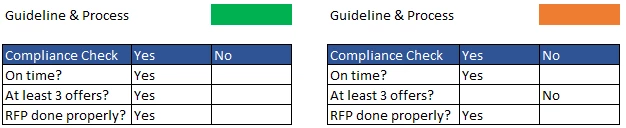
 

I have been playing around with various Javascripts I found in the forums, but none really seemed to work.


Do you have any suggestions on how I could solve this? Or how I could at leaset get the answers in the dropdown to change colour depending on the selected answer? 


Thank you! 

This topic has been closed for replies.
Correct answer Nesa Nurani

Hi, small question:

How should the Javascript be if I want the "stoplight" to turn red as well, as soon as two of three options is set to no? Currently it "only" turns red when all three options are no.

Thank you!


change: (score ==0) to: (score<=1)

1 reply

try67
Community Expert
Community Expert
August 24, 2021

So if all the fields are set to Yes it should be green, if any field is set to No it should be amber, and if all are set to No it should be red?

Also, in the screenshot your fields don't look like drop-downs. What actual fields are they?

Participating Frequently
August 24, 2021

So if all the fields are set to Yes it should be green, if any field is set to No it should be amber, and if all are set to No it should be red? // Exactly


Also, in the screenshot your fields don't look like drop-downs. What actual fields are they? // The screenshot is made in Excel just for demonstrations purposes. The fields would be Dropdown fields in Acrobat Pro

try67
Community Expert
Community Expert
August 24, 2021

OK. Will the fields only have Yes and No as their options? There's no "blank" default option?