


darkroom050775273
Participant
Nov 1, 2019 12:46 PM UTC
Answered

Conditional formatting of cell's fill based on text value

Hi, I am sure the answer is out there and have probably missed it. 

I have created a form in indesign, exported it as interactive pdf. One of the cells (Deficiency) has a drop down list with options Yes/No/ N/A. I would like the fill colour of the box and its two adjacent cells to change to Red wherever the deficiency option is YES. Is this condition possible (either in Acrobat or even Indesign) with text values or does it only work with numeric values? It's the first time I am using javascripts so I am pretty uncertain what to change in the codes I found which could potentially offer the solution. Screenshot of form attached. Much appreciate any help or suggestions- thank you! 
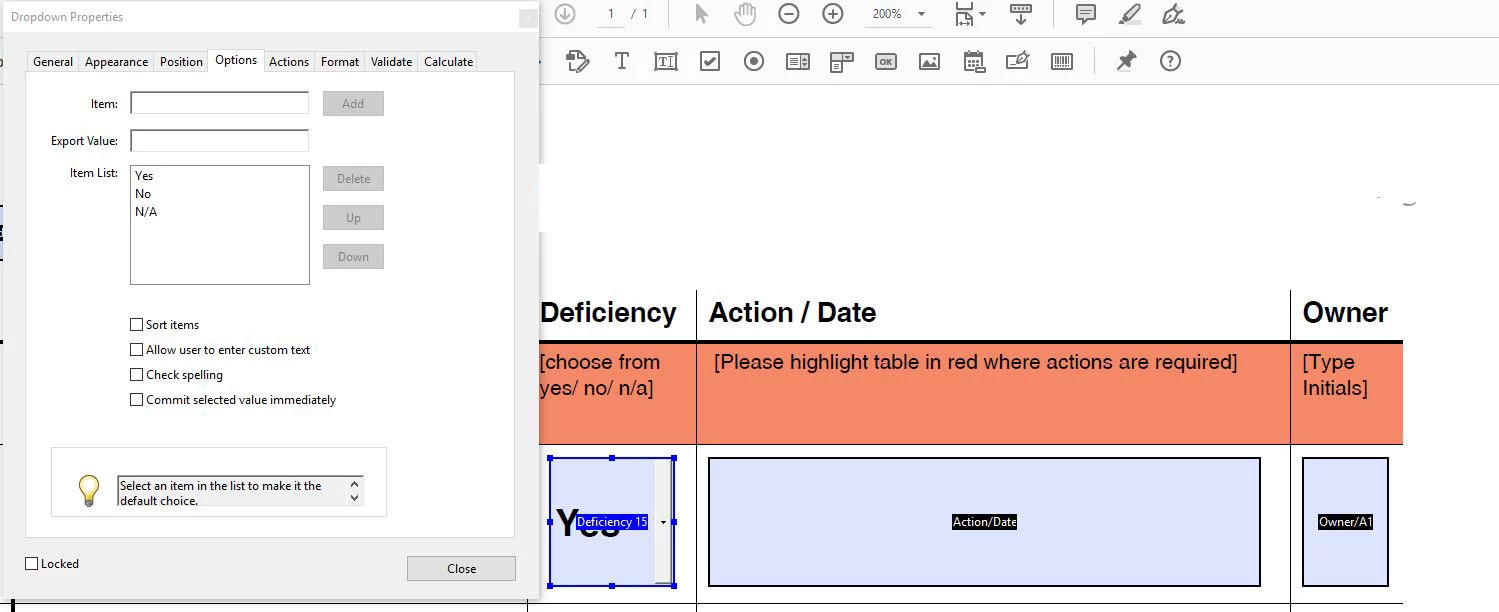
 

This topic is closed to new replies. Start a new post to keep the conversation going.
try67
try67Correct answer
Community Expert
Nov 1, 2019 1:46 PM UTC

Yes, it's possible, with any kind of value. Use this code as the custom Validation script of the drop-down field (make sure to tick the box to commit the selected value immediately, under the field's Properties, Options tab):


if (event.value=="Yes") {
	event.target.fillColor = color.red;
	this.getField("Action/Date").fillColor = color.red;
	this.getField("Owner/A1").fillColor = color.red;
} else {
	event.target.fillColor = color.white;
	this.getField("Action/Date").fillColor = color.white;
	this.getField("Owner/A1").fillColor = color.white;
}

2 replies

try67
Community Expert
try67Community ExpertCorrect answer
Community Expert
Nov 1, 2019 1:46 PM UTC

Yes, it's possible, with any kind of value. Use this code as the custom Validation script of the drop-down field (make sure to tick the box to commit the selected value immediately, under the field's Properties, Options tab):


if (event.value=="Yes") {
	event.target.fillColor = color.red;
	this.getField("Action/Date").fillColor = color.red;
	this.getField("Owner/A1").fillColor = color.red;
} else {
	event.target.fillColor = color.white;
	this.getField("Action/Date").fillColor = color.white;
	this.getField("Owner/A1").fillColor = color.white;
}
Translate
darkroom050775273
Participant
Nov 4, 2019 11:05 AM UTC

Thank you so so much!! It worked like a charm - much appreciated! 

Translate
