
Participant
January 28, 2016
Answered

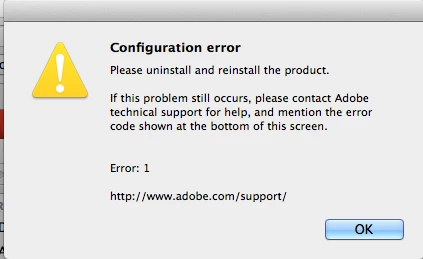
Configuration error box on acrobat pro 11.0.11 after update.
  • January 28, 2016
  • 1 reply
  • 470 views

I had a ew mother board placed into mac book pro. reinstall of all software from Time Machine. I think it was working ok but soon after reinstall I updated Pro and I think Acrobat reader which was the Dc version then kapok! Configuration error.

This topic has been closed for replies.
Correct answer AadeshSingh

Hi Darmanin123,

Refer to this KB doc. "Failed to install" error received when installing Adobe Creative Cloud desktop app‌.

Uninstall Reader DC, restart your Mac & reinstall Adobe acrobat Reader DC Adobe - Adobe Acrobat Reader DC Distribution.

Also uninstall Acrobat XI Pro & reinstall it, update it to 11.0.14 version.

Regards,
Aadesh

1 reply

AadeshSingh
Community Manager
AadeshSinghCommunity ManagerCorrect answer
Community Manager
January 28, 2016

Hi Darmanin123,

Refer to this KB doc. "Failed to install" error received when installing Adobe Creative Cloud desktop app‌.

Uninstall Reader DC, restart your Mac & reinstall Adobe acrobat Reader DC Adobe - Adobe Acrobat Reader DC Distribution.

Also uninstall Acrobat XI Pro & reinstall it, update it to 11.0.14 version.

Regards,
Aadesh