
Participant
May 15, 2020
Question

Convert excel formula into Javascript

  • May 15, 2020
  • 3 replies
  • 7279 views

Hello everyone,

I have excel spreadsheet that I'd like to convert into a fillable PDF but I don't know how to write in Javascript, can someone please help me ?

Here is what I do in Excel :

 - There is three variables Var A, Var B and Var B (picture 1)
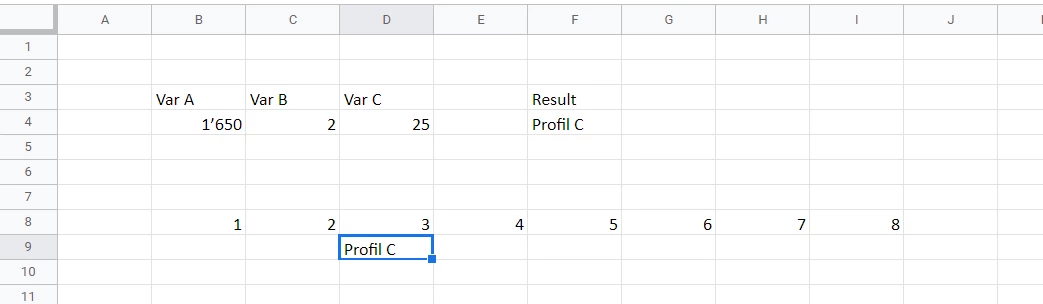
 - Depending of theses variables there is a first calculation (picture 2)

 - And to finish a last calculation that show the result in one cell (picture 3)

For information "SI" means "IF" and "ET" means "AND"

Thank you very much for your help 

This topic has been closed for replies.

3 replies

Inspiring
May 16, 2020

First, you need to assign the values of all three fields to variables:


var a = this.getField("name of field A").value
var b = this.getField("name of field B").value
var c = this.getField("name of field C").value


Then for the calculation, I noticed that your first formula only considers var b to be equal to 2  and var c to be <= 35so:


if ((b == 2)&&(c <= 35)){
        //insert code here
}


you will nest the next if inside the first one:


if ((b == 2)&&(c <= 35)){
      if ((a >= 0)&&(a < 1339)) event.value = "Profil D"
      else if ((a >= 1340)&&(a < 1674)) event.value = "Profil C"
      else if ((a >= 1675)&&(a < 2344)) event.value = "Profil B"
      else if ((a >= 2345)&&(a < 3684)) event.value = "Profil A"
      else if (a >= 3685) event.value = "Profil A+"
      else event.value = ""
}
else event.value = ""


So the full code (assuming only integer will show in your fields) in the calculate script of your answer field (D9 in your example):


//Assign variables
var a = this.getField("name of field A").value
var b = this.getField("name of field B").value
var c = this.getField("name of field C").value

//Calculation
if ((b == 2)&&(c <= 35)){
      if ((a >= 0)&&(a < 1339)) event.value = "Profil D"
      else if ((a >= 1340)&&(a < 1674)) event.value = "Profil C"
      else if ((a >= 1675)&&(a < 2344)) event.value = "Profil B"
      else if ((a >= 2345)&&(a < 3684)) event.value = "Profil A"
      else if (a >= 3685) event.value = "Profil A+"
      else event.value = ""
}
else event.value = ""


try67
Community Expert
Community Expert
May 16, 2020

Remove all instances of "var" from the code, except for the first ones.

Inspiring
May 16, 2020

that's a rookie mistake, lol, i'll correct this

Thom Parker
Community Expert
Community Expert
May 15, 2020

I would suggest you consider learning JavaScript, or hiring an expert to help you with this conversion.

https://www.pdfscripting.com/public/main.cfm

Thom Parker - Software Developer at PDFScriptingUse the Acrobat JavaScript Reference early and often
try67
Community Expert
Community Expert
May 15, 2020

This is very basic JS syntax. "IF" in JS is "if" and "AND" in JS is "&&".

You can learn more about it in multiple locations, such as here: https://www.w3schools.com/js/


Note that while the basic syntax is the same, though, Acrobat and web JavaScript implementations have a different set of objects, properties and methods.