このトピックへの返信は締め切られました。
解決に役立った回答 Mrraj

Hi,

Following are few ways to convert visio files to PDF. (Pre-requisite: Ms visio and Acrobat should be installed)

1. Right click on Visio file and select "Convert to Adobe PDF".

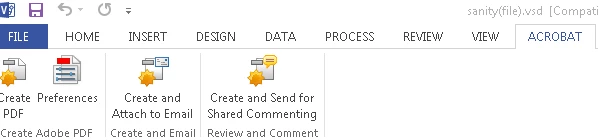
2.Open file in visio application and select Acrobat->create PDF[refer below image for help].

3.For converting multiple Visio file to PDF at a time. Launch Acrobat and go to

         a)Tools->Create PDF->Multiple Files->Create Multiple PDF Files

         b)Add Files/Folder you want to convert to pdf

         c)Select Target Folder and File Naming as per your requirement.

Thanks,

返信数 1

Mrraj
Adobe Employee
Mrraj解決!
Adobe Employee
November 24, 2016

Hi,

Following are few ways to convert visio files to PDF. (Pre-requisite: Ms visio and Acrobat should be installed)

1. Right click on Visio file and select "Convert to Adobe PDF".

2.Open file in visio application and select Acrobat->create PDF[refer below image for help].

3.For converting multiple Visio file to PDF at a time. Launch Acrobat and go to

         a)Tools->Create PDF->Multiple Files->Create Multiple PDF Files

         b)Add Files/Folder you want to convert to pdf

         c)Select Target Folder and File Naming as per your requirement.

Thanks,

mrraj