This topic has been closed for replies.
Correct answer Thom Parker

You can't script a new stamp image, at least not easily. I would be much quicker to use a button to display the image.

4 replies

thomasm16477343
Participating Frequently
March 1, 2019

Thank you.
Do you have any idea how to do this? Because what I want to do is to be able to pass the path of an image and be able to sign pdf next to that image, this has to be by code

Legend
March 1, 2019

Stamp first then sign.

Thom Parker
Community Expert
Thom ParkerCommunity ExpertCorrect answer
Community Expert
March 1, 2019

You can't script a new stamp image, at least not easily. I would be much quicker to use a button to display the image.

Thom Parker - Software Developer at PDFScriptingUse the Acrobat JavaScript Reference early and often
thomasm16477343
Participating Frequently
March 1, 2019

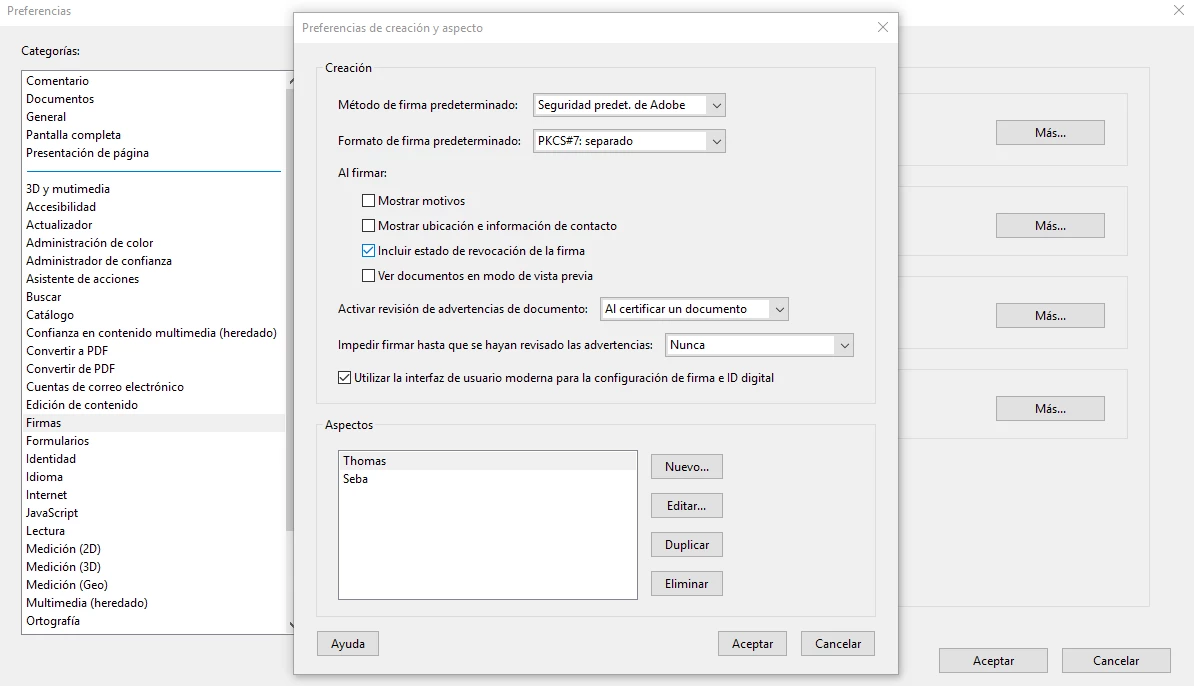
Sorry for not explaining well. I know how to apply an appearance to a digital signature, what I'm looking for is how to create an appearance from Js and then apply it to the signature

lrosenth
Adobe Employee
Adobe Employee
March 1, 2019

You cannot do that. JS has no functionality for creating appearances.

thomasm16477343
Participating Frequently
February 28, 2019

Excuse me, but I do not understand

Thom Parker
Community Expert
Community Expert
February 28, 2019

The "appearance" (aspectos) of the signature is either an image or text. This is what you asked about.

Did you mean to say that you want to apply a signature with JavaScript? Or set the signature appearance with JavaScript?

Thom Parker - Software Developer at PDFScriptingUse the Acrobat JavaScript Reference early and often
Thom Parker
Community Expert
Community Expert
February 28, 2019

A lot of people use an image of their signature.  Just take a picture of your signature and crop it to the correct size.

Thom Parker - Software Developer at PDFScriptingUse the Acrobat JavaScript Reference early and often