
Participant
June 28, 2016
Answered

Creating Editable Flyer Template in Acrobat Pro :: for Reader Users

  • June 28, 2016
  • 1 reply
  • 2538 views

Hello,

I work for a real estate brokerage and I am trying to create an editable flyer in acrobat. My agents will be editing the template in reader. In order for them to swap out information and images I have placed text fields (for the property info) and an action button implementing javascript to prompt image swaps. But I have hit one hiccup. The main image needs to be arranged in the back of the PDF so I can layer a white text box on top of the photo. Please see the image below. Is there anyway to do this, the text box is outlined. I know it is there, I just can't place it on top of the main image (the main image is using an action button).
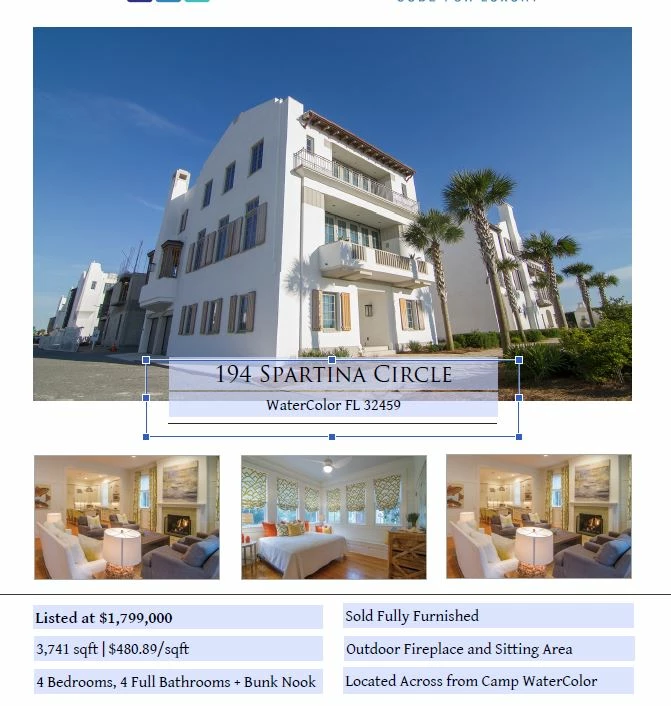
This topic has been closed for replies.
Correct answer try67

Placing fields one on top of another is tricky and not recommended. Basically, the last field you edit is the one that's going to be on top, but you can't force it in other means. It's not a good idea, generally speaking.

1 reply

try67
Community Expert
try67Community ExpertCorrect answer
Community Expert
June 28, 2016

Placing fields one on top of another is tricky and not recommended. Basically, the last field you edit is the one that's going to be on top, but you can't force it in other means. It's not a good idea, generally speaking.

Participant
June 28, 2016

I made a white background for the address text box. Kind of a tricky way to fake the box I wanted. . Thank you for your response. I have hit some other speed bumps though. After creating action buttons for the 4 photos the size of the file is now huge and when I open the file in Reader the action button only allows me to upload PDFs. I need it to be able to upload Jpegs in Reader. Any ideas? Everything I have researched says there is no way and livecycle is the only option.

try67
Community Expert
Community Expert
June 28, 2016

Your research is correct.