


Known Participant
January 19, 2018
Answered

Creating linked text boxes with a twist (if possible)

  • January 19, 2018
  • 1 reply
  • 1110 views

Hi all,

I found this great thread from a while back on reading linked text boxes in acrobat:

How to LINK two or more Text Field

It works and kudos to those who helped. Now, I have the task of creating a newsletter template for every division in my agency. They will all follow the same format which will be:

• There will be a locked header and footer

• 2 columns (2" wide) with 1/4" gap between the columns. These will be positioned on the right hand margin

• left and right margins will be 3/4" 

• There will be 3 pictures vertically placed with a one line caption underneath that will be 2 1/4" wide.

What I would like to do is create a template that the users from each department can just plug in their text (also want to keep the text at a locked size but allow the user to be able to change the style to bold or italic as needed), and place the images in the 3 allotted boxes.

Is there a way to create a fillable form where the user can bold or italicize text? I'm on a mac but most users will be on windows.

This topic has been closed for replies.
Correct answer Thom Parker

I think I know what you are asking.  This feature is already built into Acrobat, with no scripting.

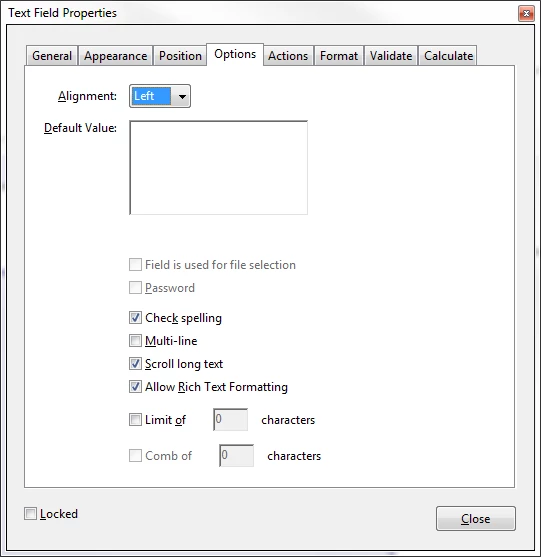
Set you entry field to "Allow Rich Text Formatting".  When the user, on Acrobat or Reader, enters text they have the option of changing the style of the text by right clicking on selected text or the current position and selecting styling options from the popup menu.

1 reply

Thom Parker
Community Expert
Community Expert
January 19, 2018

You mean bold or italicize the text typed into a form field?  Yes this is possible. A script can set any of the properties a user can set from the properties dialog. There is a also a rich text spec for form field text that can set more detailed properties, but this is more complicated to script. JavaScript is platform independent, so its the same whether the user is on Windows or Mac.

How exactly do you envision the user making these adjustments?

Thom Parker - Software Developer at PDFScriptingUse the Acrobat JavaScript Reference early and often
richdjrAuthor
Known Participant
January 19, 2018

Thanks Thom! So each division in my construction company will be publishing a monthly newsletter using this PDF template so we want to give them the option to bold text in a paragraph or make some text bold/italic... following the layout I described in my original post but limiting the font size.

It would be nice if there was a text toolbox that they could edit those features.

The other thing that I want to stress is that some of the people using this will have the barest of knowledge when it comes to acrobat.

Thom Parker
Community Expert
Thom ParkerCommunity ExpertCorrect answer
Community Expert
January 19, 2018

I think I know what you are asking.  This feature is already built into Acrobat, with no scripting.

Set you entry field to "Allow Rich Text Formatting".  When the user, on Acrobat or Reader, enters text they have the option of changing the style of the text by right clicking on selected text or the current position and selecting styling options from the popup menu.

Thom Parker - Software Developer at PDFScriptingUse the Acrobat JavaScript Reference early and often